If you have spent any time researching AI voice generators, you have probably already come across ElevenLabs.
It appears in YouTube tutorials, AI tool roundups, voice cloning demos, and almost every list of the best text-to-speech platforms.
But popularity is not the question that matters.
For a beginner, the real question is much simpler:
Does the ElevenLabs plan you can actually afford give you the features and commercial rights you need?
That is what this ElevenLabs review for 2026 is about.
Instead of repeating the marketing page, I looked at the current pricing structure, credit system, voice cloning limits, commercial licensing rules, Pay As You Go options, YouTube disclosure requirements, and the AI transparency rules that now matter in the EU.
By the end, you should know:
- Which ElevenLabs plan makes sense for beginners
- What the free plan can and cannot be used for
- When voice cloning becomes available
- How the credit system really works
- Whether ElevenLabs is suitable for monetized YouTube content
- How it compares with Murf AI, Speechify, and Chatterbox
- Whether a cheaper or open-source alternative makes more sense for you
If you are putting together a broader creator workflow, you may also want to see my guide to the best AI tools for content creators in 2026.
Affiliate disclosure: This article contains affiliate links. If you sign up through one of them, we may earn a commission at no additional cost to you. This does not affect the price you pay or the recommendations in this review.
Table of Contents
What Is ElevenLabs?
ElevenLabs is an AI audio and creative platform built around realistic speech generation.
At its simplest, you paste text, choose a voice, and ElevenLabs converts that text into spoken audio.
But the platform has expanded well beyond basic text-to-speech.
Depending on the product and plan, ElevenLabs now offers tools for:
- Text-to-speech
- Speech-to-text
- Voice cloning
- Voice design
- Dubbing
- Voice changing
- Sound effects
- AI music
- Long-form audio production through Studio
- Image and video generation
- Conversational AI agents
- Developer APIs
For creators, the most relevant part of the platform is ElevenCreative, where voiceovers, dubbing, music, sound effects, and Studio projects live.
Most creative-generation features consume credits from your monthly credit allowance. ElevenAgents is different: its main usage is measured in call minutes, with some additional services potentially carrying separate usage costs.
Who Is ElevenLabs Best For?
ElevenLabs makes the most sense for people who regularly publish audio-based content, including:
- YouTube creators
- Faceless YouTube channels
- Podcasters
- Course creators
- Audiobook producers
- Video marketers
- Developers building voice-enabled products
- Creators translating or dubbing content into multiple languages
The Main Strength
The biggest reason to use ElevenLabs is still the quality and flexibility of its speech generation.
You can start with stock voices, design new ones, clone your own voice on paid plans, create multilingual narration, and move longer projects into Studio without leaving the platform.
The Main Weakness
The credit system takes time to understand.
Different products consume credits differently, and repeated generations can reduce your monthly allowance faster than you expect.
The good news is that ElevenLabs now explains credit usage more clearly, provides limited free regenerations in some cases, and offers Pay As You Go top-ups for users who need more usage without immediately moving to a higher subscription.
ElevenLabs Features Worth Understanding Before You Pay
ElevenLabs has enough features to overwhelm a first-time user.
For most creators, however, only a handful should influence which plan you choose.
1. Text-to-Speech and the Voice Library
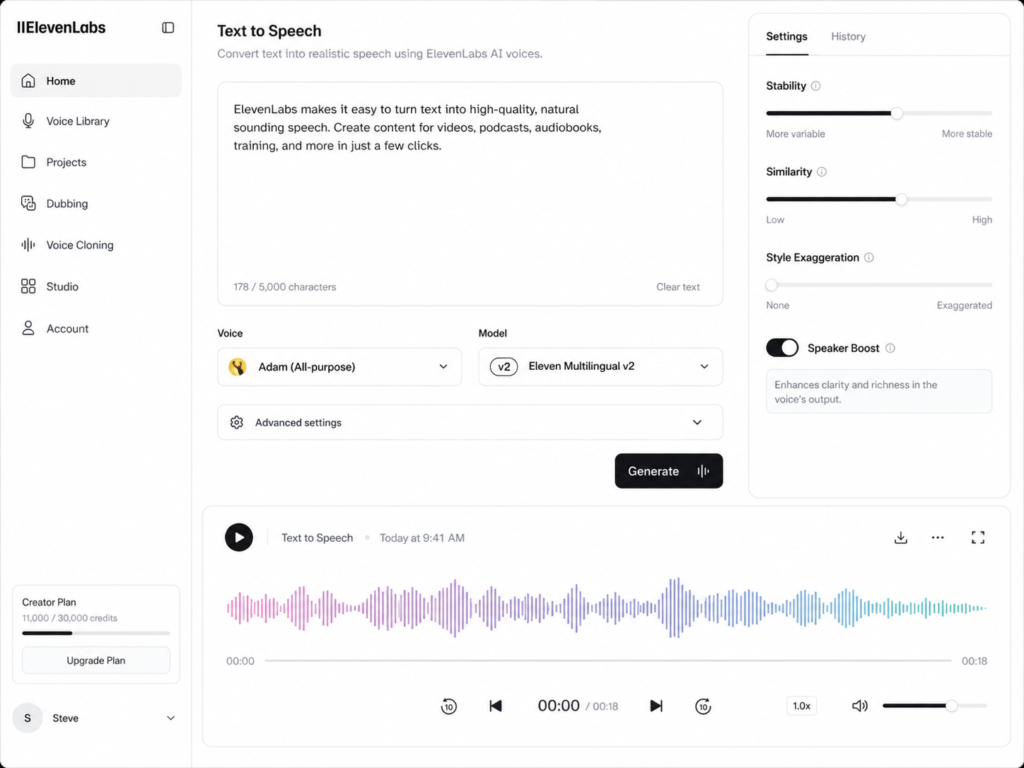
Text-to-speech is the core ElevenLabs product.
You enter your script, select a voice and model, adjust the settings, and generate the audio.
The Free plan already gives you access to text-to-speech, so you do not need to pay simply to find out whether you like the sound of ElevenLabs.
The important detail is that model choice affects credit usage.
For example, ElevenLabs currently states that its Multilingual V2 model generally consumes one credit per text character, while some Flash and Turbo usage can be cheaper depending on where and how it is generated.
That means two creators with the same monthly plan may get different amounts of usable audio depending on the models and products they choose.
Do not think of credits as a fixed number of audio minutes.
Think of them as a monthly production budget.
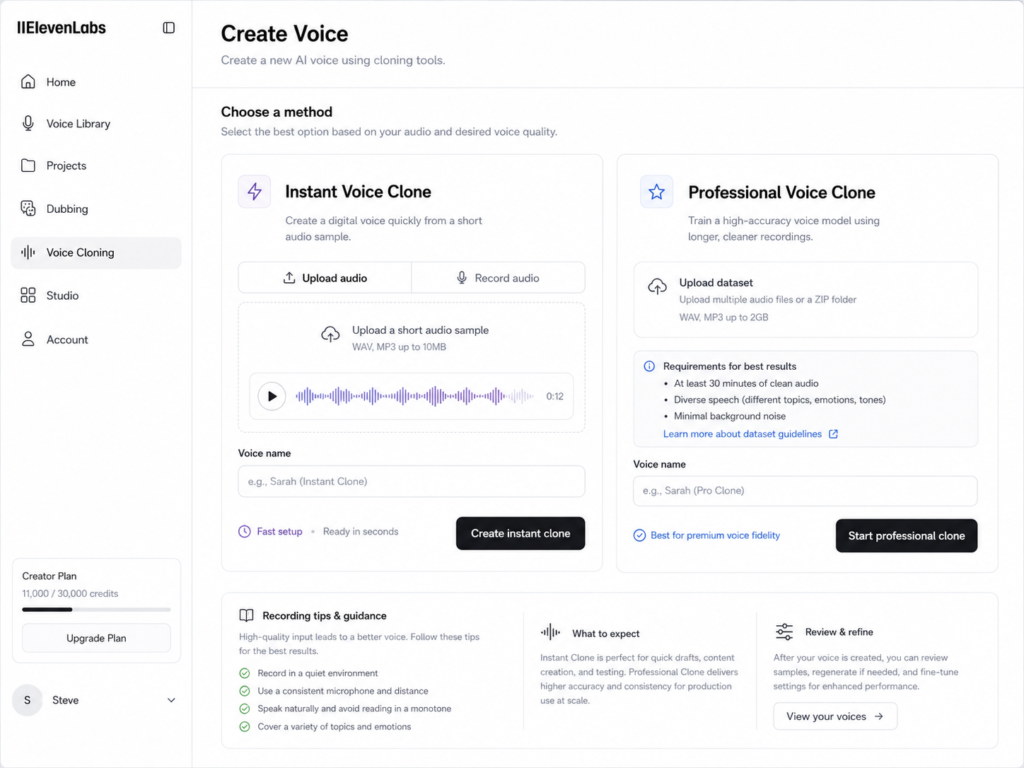
2. Voice Cloning — The Plan Difference That Matters Most
If voice cloning is the reason you are considering ElevenLabs, pay attention to this section.
The Free plan does not include voice cloning.
The current plan structure is:
- Instant Voice Cloning: starts with Starter at $6/month
- Professional Voice Cloning: starts with Creator at $22/month
- Scale includes additional Professional Voice Clone capacity
- Business increases that capacity further
ElevenLabs currently lists Instant Voice Cloning as a Starter feature and Professional Voice Cloning as a Creator feature.
So if your goal is specifically to clone your own voice, paying for Starter is the cheapest subscription route.
You can still test the general quality of ElevenLabs before paying by using the stock voices and other free features.
Try ElevenLabs and test the free plan here.
3. Dubbing and Multilingual Content
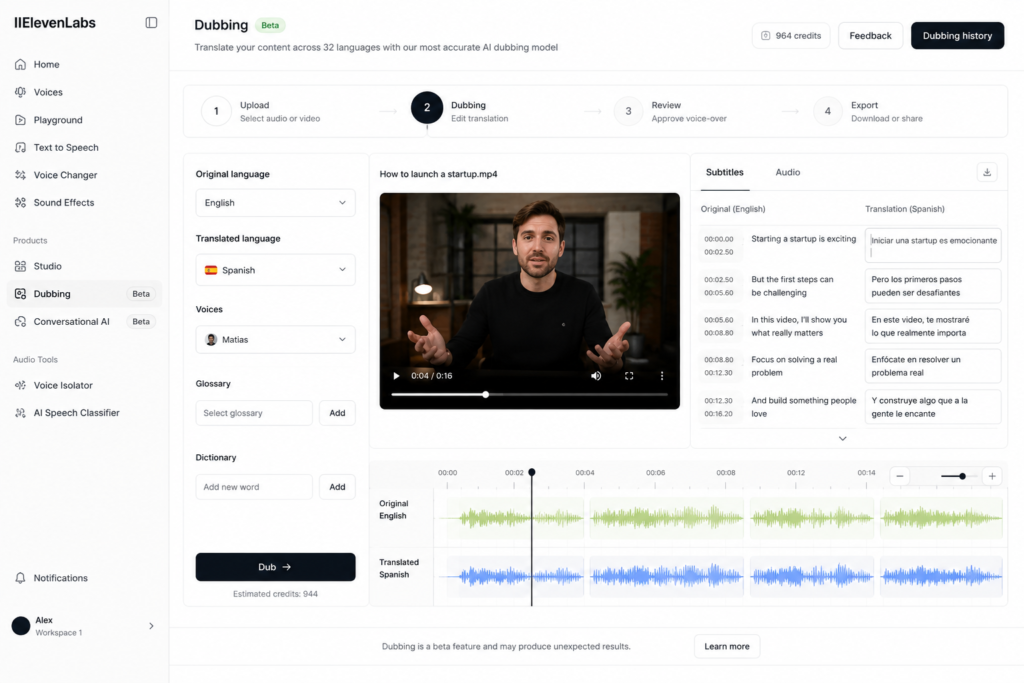
Dubbing becomes especially useful when you already have successful content in one language and want to republish it for another audience.
ElevenLabs currently includes Dubbing Studio from the Starter tier upward, alongside automatic dubbing capabilities elsewhere in the platform.
For example, a creator with an English YouTube video could use dubbing to produce versions for Spanish, French, German, or other audiences without recording every narration manually.
But this is also a feature that is easy to overvalue.
If you only publish in one language and have no plans to localize your content, dubbing should not influence your subscription decision.
4. Studio for Longer Projects
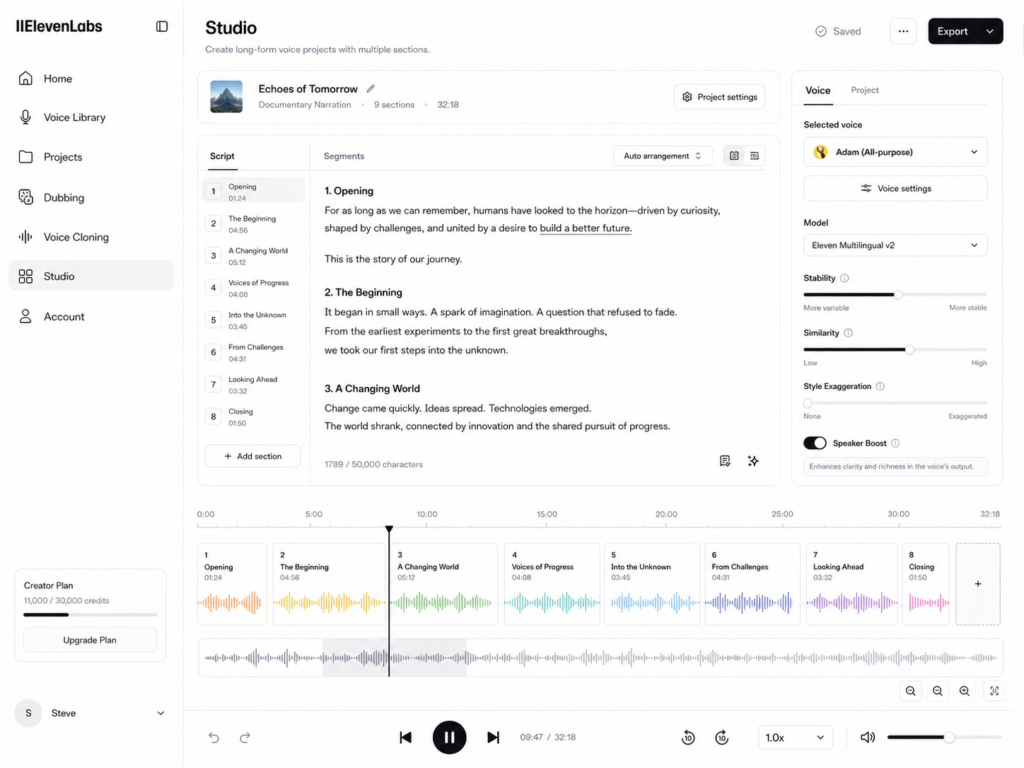
Studio is designed for longer-form audio projects.
Instead of treating your entire script as one large text-to-speech generation, you can break a project into sections and manage narration in a more structured environment.
This becomes useful for:
- Audiobooks
- Long YouTube videos
- Courses
- Documentary narration
- Podcasts
- Multi-chapter projects
The current Free plan includes 3 Studio projects, while Starter increases the allowance to 20 projects.
That difference matters more than it may initially seem.
Three projects may be enough for occasional testing.
It is not much if you are producing a course with ten modules or managing several long-form videos at once.
5. Features Most Beginners Can Ignore
ElevenLabs includes several advanced features that sound impressive but should not determine your first subscription.
API access
If you are manually creating voiceovers for videos, you probably do not need the API.
API pricing and usage have their own structure, and ElevenLabs now also supports Pay As You Go usage for developer workloads.
Unless you are automating content generation or building an application, ignore this when choosing your first creator plan.
ElevenAgents
ElevenAgents is designed for conversational AI applications such as phone agents, chat, customer service, and automated interactions.
Its core billing is based on call minutes rather than the normal creative credit calculation.
That is interesting for businesses and developers.
It is largely irrelevant if you just want narration for YouTube videos.
Workspace Seats
Scale and Business add multiple workspace seats.
Useful for teams.
Irrelevant if you work alone.
44.1kHz PCM Through the API
This becomes available on Pro and above.
Most beginner YouTube creators do not need to pay $99 per month because of an API audio-format specification.
ElevenLabs Pricing in 2026
Here is the current monthly subscription lineup.
| Plan | Monthly Price | Credits / Month | Approx. TTS Minutes | Commercial License | Voice Cloning |
|---|---|---|---|---|---|
| Free | $0 | 10,000 | ~10 | No | None |
| Starter | $6 | 30,000 | ~30 | Yes* | Instant |
| Creator | $22 | 121,000 | ~121 | Yes* | Instant + Professional |
| Pro | $99 | 600,000 | ~600 | Yes* | Instant + Professional |
| Scale | $299 | 1.8M | ~1,800 | Yes* | Includes 3 Professional Voice Clones |
| Business | $990 | 6M | ~6,000 | Yes* | Includes 10 Professional Voice Clones |
| Enterprise | Custom | Custom | Custom | Yes* | Custom |
Creator is currently discounted to $11 for the first month.
The approximate text-to-speech minutes above are ElevenLabs’ own estimates for standard UI usage and should not be treated as a guaranteed amount of finished audio. Actual usage depends on the models and products you use.
*Paid subscriptions generally include commercial rights, but Beta Services and certain service-specific features may be subject to additional restrictions.
Pricing checked: August 19, 2026.
Pricing, discounts, and feature limits can change. Always confirm the current plan details before purchasing.
Five Cost Details That Are Easy to Miss
The headline subscription price is only part of the story.
1. Credits Are Shared Across Creative Products
Your credits are not reserved exclusively for text-to-speech.
Speech-to-text, music, dubbing, sound effects, voice changing, and other creative tools can consume the same monthly credit pool.
ElevenLabs currently estimates, for example, different credit costs for text-to-speech, speech-to-text, music, sound effects, voice isolation, and dubbing.
So if you buy Creator for voiceovers but spend a large part of your credits generating music and dubbing videos, you will have fewer credits available for narration.
2. The Included Minutes Are Estimates
ElevenLabs lists roughly:
- 10 TTS minutes on Free
- 30 on Starter
- 121 on Creator
- 600 on Pro
- 1,800 on Scale
- 6,000 on Business
But those numbers are estimates.
Model choice and the type of generation you perform affect the real amount of work your credits can produce.
3. Annual Billing Gives You Two Months Free
ElevenLabs currently prices annual subscriptions as the equivalent of paying for ten months and receiving twelve.
That produces effective monthly prices of approximately:
- Starter: $5/month
- Creator: $18.33/month
- Pro: $82.50/month
- Scale: $249.17/month
- Business: $825/month
You pay annually rather than month by month.
For someone who already knows they will use the service for a year, that is a meaningful discount.
For a beginner who has not tested the workflow yet, I would still start monthly.
4. Unused Subscription Credits Can Roll Over
Paid plans support credit rollover.
ElevenLabs allows unused subscription credits to roll over up to twice your normal monthly quota, meaning your total balance can reach a maximum of three times the usual monthly allowance when the current month’s credits are included.
The catch is that you need to remain on an eligible paid subscription.
Rollover does not apply to Free, and cancelling or downgrading causes unused subscription credits to expire when the change takes effect.
Pay As You Go credits work differently and are not subject to the same monthly rollover cap.
5. Regenerations Can Still Consume Credits
This is where beginners can burn through a monthly allowance.
ElevenLabs charges credits per generation request rather than per download.
However, the current system can provide a limited number of free regenerations when the text and certain settings remain unchanged. ElevenLabs indicates whether a regeneration will be free before you run it.
That is better than assuming every retry is automatically free.
If you rewrite the paragraph, change the configuration, and generate it again, expect that generation to consume usage.
The practical lesson remains the same:
Test short sections before generating your entire script.
What Happens If You Run Out of Credits?
ElevenLabs now offers Pay As You Go top-ups for self-serve users.
Instead of necessarily upgrading your entire subscription when your included allowance runs out, you can add prepaid funds and continue generating.
Subscription credits are consumed first, followed by your PAYG balance.
PAYG funds currently expire 12 months after purchase and are treated separately from normal monthly rollover credits. If the prepaid balance reaches zero and automatic top-up is disabled, usage pauses rather than creating an unlimited postpaid bill.
This makes occasional usage spikes easier to manage than they used to be.
If you exceed your allowance every month, however, a larger subscription may still offer better value than repeatedly topping up.
The Free Plan and Commercial Use — Read This Before Publishing
This is one of the most important sections in this review.
The ElevenLabs Free plan does not include a commercial license.
If content generated on the Free plan is published non-commercially, ElevenLabs currently requires attribution by including either “elevenlabs.io” or “11.ai” in the title.
Free-tier Eleven Music has its own attribution requirement referencing “Eleven Music.”
Paid plans generally include commercial licensing for content created while the paid subscription is active, subject to ElevenLabs’ terms, intellectual-property requirements, service-specific terms, and exclusions such as Beta Services.
Can You Use ElevenLabs Free on a Monetized YouTube Channel?
Do not rely on the Free plan for monetized publishing.
If your channel earns advertising revenue, includes sponsorships, sells products, promotes paid services, or otherwise uses the generated content commercially, move to a paid plan that includes commercial rights.
For most individual creators, that makes Starter at $6/month the practical entry point, not Free.
The Free tier is better treated as a testing environment.
ElevenLabs Review: Pros and Cons
Pros
- Very natural text-to-speech output
- Strong emotional and expressive voice options
- Free tier for testing before paying
- Starter costs only $6/month
- Commercial licensing begins on paid plans
- Instant Voice Cloning begins at Starter
- Professional Voice Cloning begins at Creator
- Strong dubbing and multilingual workflow
- Studio supports longer projects
- Subscription credits can roll over
- PAYG top-ups make occasional usage spikes easier to handle
- Many creative audio tools are available from one platform
Cons
- Free output cannot be used commercially
- Voice cloning is unavailable on Free
- The credit system is less predictable than simple flat-rate tools
- Multiple creative features compete for the same credit allowance
- Repeated generations can use credits quickly
- Rollover subscription credits can be lost when cancelling or downgrading
- The interface now contains many products that a simple voiceover creator may never use
- Professional Voice Cloning requires Creator or above
How ElevenLabs Compares With the Alternatives
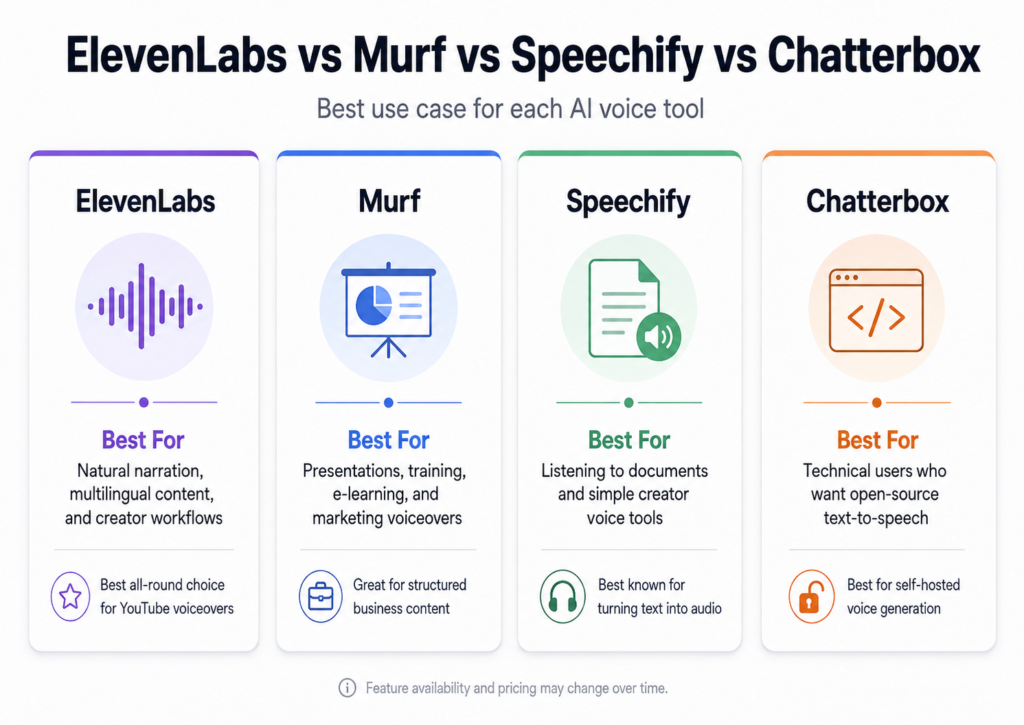
ElevenLabs is not the only useful AI voice platform.
The better question is which alternative solves the specific problem you care about.
| Tool | Best For | Free Option | Voice Cloning | Main Trade-Off |
|---|---|---|---|---|
| ElevenLabs | Natural narration, multilingual content, creator workflows | Yes, non-commercial | From Starter | Credit system |
| Murf AI | Presentations, training, marketing voiceovers | Free trial | Enterprise-focused | Free trial does not include downloads |
| Speechify | Listening to documents and creator voice tools | Yes | Available through creator tools | Product lineup can be confusing |
| Chatterbox | Technical users wanting open-source TTS | Fully open source | Zero-shot cloning | Requires self-hosting and technical setup |
Murf AI — Better for Presentation-Style Workflows
Murf is worth considering if your content revolves around:
- Training videos
- Presentations
- E-learning
- Corporate content
- Marketing voiceovers
Its Studio is structured around voice-generation workflows and visual content production.
Murf’s current free trial includes limited voice-generation time but does not allow project downloads, so it is better viewed as a product demo than a permanently usable free publishing plan.
Another major difference is voice cloning.
Murf currently positions its self-service voice cloning differently from ElevenLabs and states that its professional Voice Cloning service is available through Enterprise rather than normal self-service creator plans.
If easy self-service voice cloning is important to you, ElevenLabs has the simpler entry point.
Speechify — Useful, but Understand Which Product You Need
Speechify is often mentioned in discussions about AI voices, but you need to distinguish between its reading tools and its creator tools.
The core Speechify product is heavily focused on turning written material into audio so you can listen to:
- Articles
- PDFs
- Documents
- Books
- Study material
Speechify also has separate creator-focused products such as its AI Voice Generator and Studio capabilities for generating voiceovers and audiovisual content.
That means someone who simply wants a document reader and someone producing commercial YouTube narration may be looking at two very different Speechify workflows.
For pure content production, compare the creator product rather than assuming the standard reading subscription is an ElevenLabs equivalent.
Chatterbox — The Open-Source Alternative
Chatterbox by Resemble AI is the most interesting alternative if your budget is genuinely zero and you are technically comfortable.
It is an open-source text-to-speech model released under the MIT license.
Chatterbox supports features including:
- Zero-shot voice cloning
- Emotion control
- Multilingual generation
- Local deployment
- Built-in PerTh watermarking
Resemble AI states that voice cloning can work from only a few seconds of reference audio, and the official project is MIT licensed.
That makes Chatterbox very different from ElevenLabs.
There is no monthly credit bill when you run the model yourself.
But there is also no polished ElevenLabs-style hosted workflow doing everything for you.
You need to install, configure, run, and maintain the model yourself.
Best for:
Technically comfortable creators or developers who generate a lot of audio and value control over convenience.
Not ideal for:
Beginners who want to open a website, paste a script, and download finished narration in a few minutes.
What About Descript?
Descript is worth considering when your main problem is not simply generating a voice.
Its strength is editing audio and video through a transcript-based workflow.
That can make it especially useful for YouTubers and podcasters who need to edit recordings, fix spoken sections, and manage video rather than only convert text to speech.
I cover that workflow separately in my Descript review for YouTube beginners.
For pure AI narration, I would choose ElevenLabs first.
For editing a complete recorded production, Descript may fit better.
Where ElevenLabs Still Wins
ElevenLabs remains particularly strong when you care about several things at once:
- Natural narration
- Expressive delivery
- Voice cloning
- Multilingual output
- Dubbing
- Long-form production
- A beginner-friendly web interface
An open-source model may be cheaper.
A presentation-focused tool may have a workflow you prefer.
A transcript editor may be better for post-production.
But ElevenLabs combines a lot of creator-oriented audio features in one place without requiring you to build the workflow yourself.
That is its real advantage.
How to Get Started With ElevenLabs in 5 Steps
You do not need to subscribe immediately.
1. Create a Free Account
Start with the Free tier and test the actual voices.
Do not choose a paid plan because a YouTuber told you which voice sounds best.
Listen to it yourself.
2. Pick Several Stock Voices
Do not test only one voice.
Choose at least three that fit your content style.
For example:
- Documentary
- Tutorial
- Storytelling
- Business
- Entertainment
The voice that sounds impressive in a ten-second demo may become tiring in a ten-minute video.
3. Test Around 150–200 Words
Do not paste your full 2,000-word script immediately.
Use a real section from the type of content you plan to publish.
Ideally, include:
- Short sentences
- Long sentences
- Numbers
- Names
- Questions
- Emotional phrases
That gives you a much better idea of how the voice will perform in a real project.
If you still need help creating the script itself, these free AI writing tools for beginners can help you build a first draft before generating the narration.
4. Test the Model and Settings
Try different models and settings before committing to a long generation.
Listen for:
- Pacing
- Pronunciation
- Emotion
- Pauses
- Consistency
- Mispronounced names
Remember that model choice can also affect your credit consumption.
5. Generate the Final Audio and Edit Your Video
Once the sample sounds right, generate the longer version.
Free speech synthesis supports MP3 output at 44.1kHz and 128kbps, while higher tiers provide additional quality options depending on the workflow.
After downloading your narration, you can bring it into your video editor.
If you use CapCut, my guide on how to use CapCut on PC walks through the desktop workflow.
Three Mistakes Beginners Make With ElevenLabs
Mistake 1: Generating the Entire Script Before Testing
Imagine generating a 15-minute narration and discovering that the voice consistently mispronounces the name of your product.
You now need to regenerate large sections.
Test first.
Generate later.
Mistake 2: Treating Credits as Guaranteed Minutes
The “minutes included” figures are estimates.
Different models and ElevenLabs products consume credits differently.
If you also use music, dubbing, sound effects, or other tools, your narration allowance will effectively shrink.
Mistake 3: Publishing Free-Tier Audio Commercially
Free is for testing and eligible non-commercial use with the required attribution.
It is not the subscription I would use to build a monetized content business.
If the content is part of a commercial workflow, move to a plan with commercial rights.
The Legal Side: Commercial Rights, YouTube, Voice Cloning, and the EU AI Act
This section is important because AI voice rules now come from several different places.
There are at least four separate questions:
- Does ElevenLabs allow the use?
- Does the person whose voice you are using allow it?
- Does the publishing platform require disclosure?
- Does applicable law require transparency?
Those are not the same question.
This section is general information, not legal advice.
Commercial Rights
ElevenLabs’ Free plan does not provide a commercial license.
Paid plans generally do, subject to the company’s Terms of Service, Service-Specific Terms, applicable law, intellectual-property rights, and restrictions such as those applying to Beta Services.
An additional useful point is that content created while you had an eligible paid subscription does not automatically lose its commercial license simply because you later end the subscription. ElevenLabs states that content generated during the paid subscription can continue to be used commercially, subject to the relevant terms.
YouTube Disclosure — AI Voice Does Not Automatically Mean “Disclose Everything”
One of the most repeated claims online is:
“YouTube requires you to disclose every AI voice.”
That is too broad.
YouTube’s policy focuses on realistic altered or synthetic content that could mislead viewers about a real person, event, or situation.
Its current examples specifically distinguish some forms of AI assistance from cases that require disclosure.
For example, YouTube lists cloning your own voice for voiceovers or dubbing among examples that do not require the altered-content disclosure.
On the other hand, using AI to make a real person appear to say something they did not say is exactly the kind of realistic synthetic content YouTube expects creators to disclose.
There is also a separate impersonation issue.
YouTube prohibits deceptive impersonation, including using an AI-generated version of someone’s voice or likeness to falsely make a channel or content appear authorized by that individual.
So the practical distinction is:
Generic AI narration or your own cloned voice is not automatically the same thing as deceptively cloning another identifiable person.
And disclosure is not a magic permission slip.
Content can be properly disclosed and still violate privacy, impersonation, copyright, fraud, or other rules.
The EU AI Act — What Changed in August 2026?
This is where many older AI articles are now outdated.
Article 50 of the EU AI Act became applicable on August 2, 2026.
The rules include transparency requirements affecting providers and certain professional deployers of AI systems.
For creators, the most relevant concept is deepfake disclosure.
The Commission describes a deepfake as AI-generated or manipulated image, audio, or video that resembles an existing person, object, place, entity, or event and could falsely appear authentic or truthful.
When a professional deployer publishes qualifying deepfake content, disclosure must be made clearly by the first exposure at the latest.
Importantly, a visible or audible disclosure may be required; simply relying on hidden machine-readable metadata is not necessarily enough.
Does This Apply to Every Hobby Creator?
No.
The European Commission’s current guidance distinguishes personal, non-professional activity from professional activity.
A natural person using AI purely personally can fall outside the deployer definition.
However, when the activity regularly creates economic benefit or forms part of a business, trade, occupation, or freelance activity, that person can be treated as a professional deployer.
That distinction matters for monetized creators.
What About the December 2026 Grace Period?
There is a limited grace period until December 2, 2026, but it should not be misunderstood as a blanket delay of Article 50.
The Commission says it applies specifically to the provider-side machine-readable marking and detection obligation for certain AI systems placed on the market before August 2, 2026.
It is not a general “creators do not need to worry until December” rule.
Voice Cloning Consent
Voice cloning is the area where you should be most conservative.
If you clone your own voice, the permission issue is straightforward.
If you are working with another person, obtain clear permission covering the intended use.
Avoid taking audio of a celebrity, creator, customer, employee, or private individual and using it to make them appear to say things they never said.
Even if the software technically allows an action, you may still run into platform policies, privacy rights, publicity rights, fraud rules, contracts, or other legal restrictions.
A simple rule is useful:
If it is not your voice, do not assume you have the right to clone it.
Which ElevenLabs Plan Should You Choose?
Best for Testing: Free
Choose Free if:
- You have never used ElevenLabs
- You want to compare voices
- You want to learn the interface
- You are not publishing the generated content commercially
- You do not need voice cloning
I would not use Free as the foundation of a monetized channel.
I would use it to decide whether I like ElevenLabs.
Best for Beginners: Starter — $6/Month
For most new creators, Starter is the most sensible paid plan.
You get:
- 30,000 credits
- Around 30 estimated TTS minutes
- Commercial licensing, subject to the applicable terms
- Instant Voice Cloning
- Dubbing Studio
- 20 Studio projects
- Access to additional paid-plan features
That is enough to move from “testing an AI voice tool” to “actually publishing content.”
For a small YouTube channel producing a few narrated videos each month, I would start here.
Check the current ElevenLabs plans here.
Best for Regular Creators: Creator — $22/Month
Creator is where ElevenLabs becomes much more comfortable for regular production.
It currently includes:
- 121,000 monthly credits
- Around 121 estimated TTS minutes
- Professional Voice Cloning
- Instant Voice Cloning
- Commercial licensing
- Additional credit options
- Everything in Starter
There is also currently a 50% first-month offer, bringing the first month to $11.
If you upload narrated videos every week, Creator is probably the plan I would compare most seriously against Starter.
Who Needs Pro?
Pro costs $99 per month.
For the typical beginner, that is unnecessary.
It makes more sense once:
- You generate hundreds of minutes regularly
- Audio is central to your business
- You need higher-end output options
- You use the API professionally
- Creator limits have become an actual bottleneck
Do not upgrade because Pro looks more professional on the pricing table.
Upgrade because you can point to a specific limit that is costing you time or money.
My Recommendation
Best for Most Beginners: ElevenLabs Starter
At $6 per month, Starter is where ElevenLabs starts making sense as a publishing tool rather than just a demo.
You gain commercial rights under the normal paid-plan terms, Instant Voice Cloning, more Studio projects, and a larger monthly credit allowance.
For a new monetized YouTube creator, this is the plan I would start with.
Best Free Option for Testing: ElevenLabs Free
The Free plan is excellent for answering one question:
Do I like the voices enough to pay for this?
Use it to compare voices and test scripts.
Do not build a commercial workflow around it.
Best Truly Free Option for Technical Users: Chatterbox
If you want to create large amounts of audio without a subscription and you are comfortable self-hosting software, Chatterbox is more interesting.
It is open source, MIT licensed, supports zero-shot voice cloning, and gives you far more control.
The cost you save in subscription fees is replaced by technical setup and maintenance.
Best for Regular Voice Production: ElevenLabs Creator
If you produce narration every week, Creator is the sweet spot in the ElevenLabs lineup.
The jump from 30,000 to 121,000 monthly credits is significant, and Professional Voice Cloning becomes available.
It is much easier to work normally without constantly checking the credit counter.
Best for Presentation and E-Learning Workflows: Murf AI
Murf deserves consideration when your work revolves around training, slide decks, corporate presentations, and structured marketing material.
Its workflow may suit that type of production better than ElevenLabs.
Best for Editing Existing Audio and Video: Descript
If your work starts with recorded footage rather than a written script, Descript may solve a different problem more effectively.
Use ElevenLabs primarily to generate narration.
Use something like Descript when you primarily need to edit spoken content.
Conclusion: Is ElevenLabs Worth It in 2026?
For most creators who need AI-generated narration, yes.
But that answer needs context.
ElevenLabs is not worth paying for simply because it is popular.
It is worth considering because the entry-level paid plan is inexpensive, voice cloning becomes available early, the generated speech can sound highly natural, Studio works for longer projects, and you can expand into dubbing and multilingual production without rebuilding your workflow around another platform.
The Free plan is good for testing.
Starter is the plan I would choose for a beginner publishing commercial content.
Creator is where I would move once narration becomes a regular part of my production schedule.
And if you are technically comfortable and produce enough audio for subscription credits to become expensive, an open-source option such as Chatterbox deserves serious consideration.
The most sensible next step does not require buying anything.
Take 150–200 words from one of your real scripts.
Generate it using several ElevenLabs voices.
Listen with headphones.
Then ask yourself one question:
Would I be happy hearing this voice across an entire ten-minute video?
If the answer is yes, the $6 Starter plan is a very low-cost way to begin publishing.
Try ElevenLabs here and compare the current plans.
Frequently Asked Questions
Is ElevenLabs free to use?
Yes.
ElevenLabs has a Free plan that currently includes 10,000 monthly credits and roughly 10 estimated minutes of text-to-speech.
However, the Free plan does not include commercial licensing or voice cloning.
If you publish eligible Free-plan content non-commercially, ElevenLabs currently requires attribution.
How much does ElevenLabs cost per month?
The current monthly plans are:
- Free: $0
- Starter: $6
- Creator: $22
- Pro: $99
- Scale: $299
- Business: $990
- Enterprise: Custom pricing
Creator is currently $11 for the first month as part of a 50% first-month discount.
Prices may change, so check the live pricing before subscribing.
Can I use ElevenLabs on a monetized YouTube channel?
You should use an eligible paid plan for commercial publishing.
The ElevenLabs Free plan does not include a commercial license, while paid subscriptions generally do, subject to the company’s terms and applicable service-specific restrictions.
Starter is currently the cheapest paid subscription at $6 per month.
Can I clone my voice for free with ElevenLabs?
No.
Voice cloning is not included on the Free plan.
Instant Voice Cloning starts with Starter, while Professional Voice Cloning starts with Creator.
How many minutes do I get with ElevenLabs Creator?
ElevenLabs currently estimates approximately 121 minutes of text-to-speech from the Creator plan’s 121,000 monthly credits.
Treat this as an estimate rather than a guaranteed limit because credit usage can vary by model and product.
Do unused ElevenLabs credits roll over?
Yes, on eligible paid subscription plans.
Unused subscription credits can roll over up to twice your normal monthly quota, allowing a maximum balance of three times the normal monthly allowance when the current month’s quota is included.
Free-plan credits do not roll over.
Cancelling or downgrading causes unused subscription credits to expire when the plan change takes effect.
Does regenerating audio use more credits?
Usually, a new generation can consume additional credits.
However, ElevenLabs now allows a limited number of free regenerations in some cases when the content and certain settings have not changed.
The interface indicates whether the regeneration will be free before you generate it.
What happens when I run out of credits?
ElevenLabs now supports Pay As You Go top-ups for self-service users.
You can add prepaid funds that are used after your subscription credits are exhausted rather than automatically moving to a larger subscription.
PAYG funds currently expire after 12 months.
Does YouTube require disclosure for every AI voice?
No.
YouTube focuses its disclosure rules on realistic altered or synthetic content that could mislead viewers.
Its current examples specifically list cloning your own voice for voiceovers or dubbing among uses that do not require disclosure.
Using synthetic media to make another real person appear to say or do something they did not is treated differently and can require disclosure.
Is ElevenLabs better than Murf AI?
It depends on what you are producing.
ElevenLabs is the stronger choice for creators who prioritize natural narration, easy self-service voice cloning, dubbing, and multilingual voice production.
Murf is especially worth testing for presentations, e-learning, training, and marketing workflows.
Try both with the same short script before committing to an annual subscription.
Is ElevenLabs better than Speechify?
They solve overlapping but different problems.
Speechify’s main consumer product is heavily focused on listening to documents and text.
ElevenLabs is more directly designed around generating and producing audio.
Speechify also offers separate creator-focused voice generation tools, so make sure you are comparing the correct Speechify product rather than its standard reading subscription.
What is the best free alternative to ElevenLabs?
For a beginner who wants a hosted website, there is no perfect free replacement without limitations.
For technically comfortable users, Chatterbox is one of the strongest options because it is open source, MIT licensed, and supports zero-shot voice cloning.
The trade-off is that you need to install and run it yourself.
Is ElevenLabs Starter or Creator better?
Choose Starter if you are new, publish occasionally, and want the cheapest route to commercial use and Instant Voice Cloning.
Choose Creator if you publish frequently, need substantially more credits, or want Professional Voice Cloning.
For most beginners, I would start with Starter and upgrade only when the monthly limit becomes a real constraint.
Enjoyed this guide? Support ByteTony and help us create more simple, beginner-friendly tech guides.
☕ Support ByteTony