Your rank tracker worked fine last month. Now some keywords come back as “not found,” positions jump unexpectedly, or the tool starts failing after a batch of checks.
One common cause is rate limiting or blocking of the IP address making repeated search requests.
That is where proxies can help. A proxy routes your requests through another IP address, and rotating proxies can automatically use different IPs across multiple requests. This can be useful when a self-hosted rank tracker needs to collect search results at scale or from different locations.
But many beginners do not need to buy proxies at all.
This guide compares seven proxy services for rank tracking and SERP monitoring, including free or low-cost testing options, realistic entry prices, geo-targeting, and how beginner-friendly each provider is.
We’ll also explain when a proxy is unnecessary, because spending more money is not always the right solution.
Note: This article may contain affiliate links. If you buy through them, we may earn a small commission at no extra cost to you.
Table of Contents
Do You Actually Need a Proxy for Rank Tracking?
Before comparing providers, make sure you actually need one.
You probably don’t need a proxy if:
- You only check a small number of keywords occasionally.
- You already use a hosted SEO platform such as Ahrefs, Semrush, SE Ranking, or Mangools.
- You only need occasional manual ranking checks.
- Your SEO tool already collects ranking data on its own servers.
Hosted rank trackers operate their own data-collection infrastructure. You normally don’t need to configure proxies yourself.
If you’re still building your SEO stack, you may get more value from our guide to the best free SEO tools for bloggers before paying for separate proxy infrastructure.
For occasional manual checks, you can also:
- Search in a private or incognito browser window while logged out.
- Use Google Ads’ Ad Preview and Diagnosis tool when appropriate.
- Compare results from multiple locations or devices.
- Use a rank-tracking tool that already handles location-specific data.
You may need a proxy if:
- You run a self-hosted or open-source rank tracker that queries search engines directly.
- You check hundreds or thousands of keywords.
- You need rankings from multiple countries or cities.
- You run local SEO campaigns where city-level results matter.
- You collect SERP data for research or monitoring.
- You manage several projects and need scalable data collection.
If your main goal is content research rather than automated SERP collection, proxy infrastructure may be unnecessary. Our guide to the best AI tools for content creators covers easier tools for research, writing, images, and other content workflows.
Important note about automated Google queries
A proxy can change the IP address sending a request, but it does not automatically make automated search-engine scraping compliant with a platform’s policies.
Google states that machine-generated traffic — including automated queries used to scrape search results for rank-checking purposes without express permission — violates its spam policies and Terms of Service.
Always check the rules of the search engine, website, rank tracker, and proxy provider you use.
Residential vs Datacenter Proxies for Rank Tracking
Before choosing a provider, you need to understand the main proxy types.
| Type | Best for | Relative detection risk | Typical cost |
|---|---|---|---|
| Residential | Rank tracking, local SEO, harder targets | Lower | $$ |
| Datacenter | Cheap bulk checks and testing | Higher | $ |
| ISP / Static Residential | Stable sessions with ISP-origin IPs | Low to moderate | $$ |
| Mobile | Mobile-specific and difficult targets | Generally lower | $$$ |
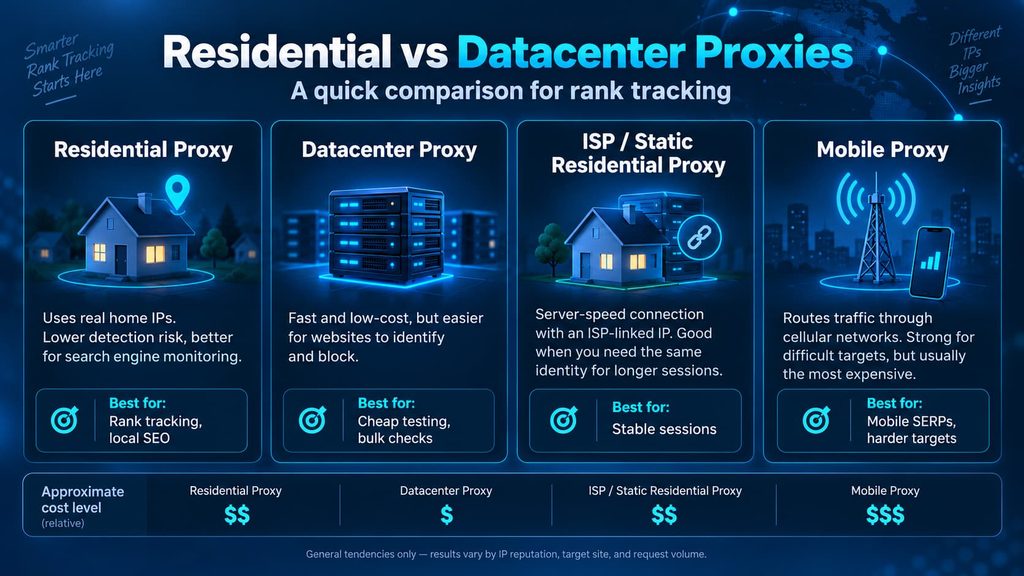
These are general tendencies, not guarantees. Whether an IP gets blocked depends on many factors, including its reputation, request frequency, target website, and how the software behaves.
Residential proxies
Residential proxies use IP addresses associated with consumer internet connections.
Because the IP appears to come from an ordinary ISP connection, residential proxies are generally a better fit for search-engine monitoring than ordinary datacenter IPs.
For most people who genuinely need proxies for rank tracking, rotating residential proxies are the safest place to start.
Datacenter proxies
Datacenter IPs come from hosting providers rather than home internet connections.
They are usually faster and considerably cheaper, but their address ranges can be easier for websites to identify.
They are still useful for:
- Testing your rank tracker’s proxy configuration.
- Low-stakes automation.
- Targets that do not aggressively filter datacenter traffic.
- Situations where price matters more than detection resistance.
ISP proxies
ISP proxies combine some characteristics of residential and datacenter proxies.
They are typically hosted on server infrastructure while using IP ranges associated with internet service providers. They are useful when you want a stable IP instead of rotating to a different address constantly.
Mobile proxies
Mobile proxies route traffic through cellular networks.
They can be useful for mobile-specific search results and difficult targets, but they are usually much more expensive than residential proxies.
Most beginner rank-tracking projects do not need them.
Avoid anonymous public proxy lists
There is a major difference between a legitimate provider offering a free plan and an unknown public proxy list.
Public proxies may be:
- Extremely slow.
- Unreliable.
- Already blocked by popular websites.
- Operated by unknown parties.
- Poorly secured.
HTTPS normally protects the contents of encrypted traffic in transit, but routing traffic through an unknown proxy still introduces unnecessary security and privacy risks.
Use a reputable provider instead.
And because proxy accounts contain credentials, API keys, and billing information, protect them properly. Our beginner guide explains how to set up a password manager safely.
How We Picked These Proxy Services
Each provider was compared using the same practical criteria:
- Free tier or low-risk trial — can a beginner test the service without a large commitment?
- Realistic entry cost — what do you actually need to spend to get started?
- Ease of setup — can an individual user configure it without enterprise support?
- Proxy types available — residential, ISP, datacenter, or mobile.
- Geo-targeting — country, state, city, ZIP, ASN, or ISP targeting where available.
- Rank-tracker compatibility — standard proxy credentials and common protocols.
Pricing and plan information was checked against provider documentation and pricing pages on September 5, 2026.
Proxy pricing changes frequently, so always check the live pricing page before purchasing.
ByteTony has not hands-on benchmarked these seven proxy networks against Google. This comparison is based on vendor documentation, pricing, capabilities, and suitability for beginner rank-tracking workflows rather than our own success-rate benchmarks.
Affiliate relationships did not influence which services were included or how they were ranked.
The 7 Best Proxies for Rank Tracking
1. Webshare — Best Free Option for Learning
Webshare is one of the easiest places to start because it offers a genuinely free datacenter proxy plan.
Best for: Beginners who want to learn how proxy configuration works before paying for residential traffic.
Free plan: 10 datacenter proxies with up to 1 GB of bandwidth per month. No credit card is required, and the free proxies do not have a traditional trial countdown.
Paid entry: 100 datacenter proxies cost around $2.99 per month. Rotating residential plans currently start around $3.50 for 1 GB, while much lower advertised per-GB rates require substantially larger volumes.
Webshare’s rotating residential network covers 195 countries and supports targeting by options including country, state, city, ZIP, and ASN.
Why Webshare is good for beginners
The free plan lets you learn several important things without spending money:
- Where your rank tracker’s proxy settings are located.
- How proxy authentication works.
- Whether your software supports external proxies.
- How to test an exit IP.
- What happens when a request is blocked.
That makes Webshare a useful training environment.
Weaknesses
The important limitation is that the free plan uses datacenter proxies, not residential ones.
That makes it useful for learning and testing, but not necessarily representative of how residential proxies will perform on search engines.
Who should skip it?
Skip the free tier if you already know how to configure proxies and need residential traffic immediately.
2. Decodo — Best for Beginners Who Want a Residential Trial
Decodo, formerly known as Smartproxy, offers residential, mobile, ISP, and datacenter proxies alongside scraping products.
Older tutorials may still use the Smartproxy name, so don’t be confused if you encounter both brands while researching setup instructions.
Best for: First-time residential proxy buyers who want to test compatibility before committing to a monthly plan.
Trial: New users can test eligible proxies for 3 days with 100 MB of traffic.
Pay as you go: Residential traffic is currently $4 per GB.
Subscription plans become cheaper per GB as traffic volume increases.
Decodo also supports detailed geo-targeting for residential proxies, including country, state, city, ZIP code, and ASN targeting.
Why it works well for rank tracking
The biggest advantage is the combination of:
- Residential IPs.
- A short trial.
- Straightforward dashboard configuration.
- Rotating and sticky sessions.
- Detailed location targeting.
- HTTP(S) and SOCKS5 support.
That makes it a practical option for someone testing a self-hosted rank tracker for the first time.
Weaknesses
The trial activates your selected paid plan after it ends unless you cancel beforehand.
If you only want to test the service, set yourself a reminder as soon as the trial begins.
The 14-day money-back policy also does not apply to usage under the free trial.
Who should skip it?
Skip Decodo if your only priority is finding the lowest possible per-GB residential rate.
3. IPRoyal — Best for Irregular Pay-As-You-Go Use
IPRoyal offers residential, ISP, datacenter, and mobile proxies.
Its residential product is particularly interesting for users who do not consume proxy bandwidth every month.
Best for: Bloggers, freelancers, and small agencies that run rank checks in occasional bursts instead of continuously.
Pricing: Residential pay-as-you-go currently starts at approximately $7.35 for 1 GB. A subscription reduces the 1 GB rate to about $7.
The price falls significantly at larger volumes, but the lowest advertised rates require very large purchases.
IPRoyal currently advertises a residential network of more than 64 million IPs across 195+ countries.
Why it works for irregular rank tracking
The biggest advantage is that purchased residential PAYG traffic generally does not expire under standard conditions.
That matters more than it sounds.
Imagine buying 10 GB for a quarterly SEO audit and only using 3 GB. With a traditional monthly plan, unused traffic may disappear at the end of the billing period.
With non-expiring traffic, you can keep the unused balance for your next project.
IPRoyal also supports rotating connections and sticky sessions.
Weaknesses
The low-volume price per GB is significantly higher than budget providers such as DataImpulse.
There is also no general self-service free residential trial for ordinary individual buyers. Enterprise trials may have separate eligibility requirements.
Who should skip it?
Skip IPRoyal if you expect to consume large amounts of residential traffic continuously and your main goal is achieving the lowest cost per GB.
4. DataImpulse — Best Value Per GB
DataImpulse is one of the most interesting budget options in this comparison.
It sells residential proxies using a pay-as-you-go model without requiring a monthly residential subscription.
Best for: Cost-conscious users who need residential proxies but do not want an expensive monthly commitment.
Entry cost: New users can start with a $5 purchase.
Residential price: $1 per GB on the standard residential product.
Traffic does not expire, and country-level targeting is included.
The provider advertises more than 90 million residential IPs across 195 countries.
Why DataImpulse stands out
At $1 per GB, the standard residential plan sets a very low entry price compared with most providers in this article.
It also supports:
- HTTP(S) and SOCKS5.
- Rotating sessions.
- Sticky sessions.
- Country targeting.
- API access.
- Non-expiring traffic.
For basic country-level rank tracking, that combination is difficult to ignore.
The important local SEO catch
DataImpulse charges differently for more precise targeting.
Country-level targeting is included in the normal price, but using advanced filters such as:
- State
- City
- ZIP code
- ASN
causes traffic routed through those filters to be billed at double the standard rate.
That means a $1/GB residential plan can effectively become $2/GB when you rely on advanced location targeting.
DataImpulse also offers a premium residential product where advanced targeting is included, but it costs more per GB.
Who should skip it?
If almost every ranking check requires city- or ZIP-level targeting, compare the effective cost against providers that include precise targeting in their normal plan price.
5. SOAX — Best for Precise Geo-Targeting
SOAX is positioned above most budget proxy providers and focuses heavily on data collection, targeting, and larger professional workloads.
Best for: Local SEO, multi-location campaigns, and projects where precise geographic targeting matters more than finding the cheapest possible proxy.
Trial: 3 days and 400 MB for $1.99.
Starter plan: Approximately $90 per month for 25 GB of residential traffic, or about $3.60 per GB.
SOAX’s plans include options such as:
- Country targeting.
- Region targeting.
- City targeting.
- ISP targeting.
- Sticky and rotating sessions.
- HTTP(S) and SOCKS5 support.
- Access across 195+ countries.
Why it works for local SEO
Rankings can change noticeably between cities — and sometimes between areas within the same metro region.
If location accuracy is central to your work, SOAX’s targeting capabilities are more relevant than simply choosing whichever provider advertises the cheapest bandwidth.
The unified plan structure also lets customers work across multiple proxy types.
Weaknesses
The minimum monthly commitment is much higher than beginner-oriented options such as DataImpulse, Webshare, or IPRoyal PAYG.
A blogger running a small personal rank tracker probably does not need a $90 monthly proxy plan.
Who should skip it?
Skip SOAX if you only need country-level checks or a few GB of traffic every few months.
6. Oxylabs — Best Managed SERP API Alternative
Oxylabs is different from the other services in this list.
Rather than focusing only on buying proxy bandwidth and configuring it yourself, Oxylabs offers a Web Scraper API that can collect search-engine results for you.
Think of a SERP API as the managed alternative to running your own proxy infrastructure.
Instead of:
- Buying proxies.
- Choosing rotation settings.
- Handling blocked requests.
- Managing retries.
- Parsing search-result pages.
you send a request to an API and receive the result.
Best for: Developers, agencies, or larger projects that would rather pay for successfully collected data than maintain their own proxy stack.
Free trial: Up to 2,000 results without a credit card.
For Google results without JavaScript rendering, the current Top-up/Micro rate is around $1 per 1,000 successful results. The Micro plan itself starts at $49 per month, while higher-volume plans offer lower per-result rates.
Why it works for rank tracking
You do not need to manually manage:
- Residential proxy endpoints.
- Rotation.
- CAPTCHA handling.
- Retries.
- Failed proxy IPs.
That can become valuable once your keyword volume becomes large enough that maintaining a proxy system turns into its own technical project.
Weaknesses
This is not the best choice for someone who simply wants to paste a proxy address into a desktop rank tracker.
Using an API normally requires technical integration or software that already supports the service.
Who should skip it?
Most beginners.
Start with ordinary proxies unless you have enough scale or development resources to justify moving to an API.
7. Proxy-Seller — Best Flexible Option for Multiple Proxy Types
Proxy-Seller offers residential, ISP, datacenter IPv4/IPv6, and mobile proxies from one account.
Best for: Users who want several proxy categories available under one provider instead of maintaining accounts with different services.
The residential product includes more than 47 million IPs across 220+ locations and supports country, region, city, and ISP targeting.
Trial: $1.99 for 3 days with limited traffic.
Realistic entry price: 1 GB of residential traffic currently costs approximately $3.50.
Larger packages reduce the per-GB cost:
- 3 GB: about $3/GB
- 10 GB: about $2.50/GB
- 25 GB: about $2.40/GB
- Larger-volume rates can eventually fall toward the advertised $1.30/GB level
This distinction matters because “from $1.30/GB” is a bulk-rate headline, not what a beginner pays when purchasing the smallest plan.
ByteTony readers can use promo code BYTETONY15 for 15% off.
You can view the current residential plans on the Proxy-Seller website.
Why it works for rank tracking
Proxy-Seller supports:
- Rotating residential IPs.
- Sticky sessions.
- Rotation by request or time interval.
- Country, region, city, and ISP targeting.
- Username/password authentication.
- IP authorization.
- HTTPS and SOCKS5.
Having residential, ISP, datacenter, and mobile products in the same dashboard can also be useful if your needs change over time.
For example, you could use cheaper datacenter proxies for simple testing and residential IPs for more difficult or location-sensitive checks.
Weaknesses
There is no permanent free tier like Webshare.
The range of products can also be more than a first-time proxy buyer needs. Make sure you understand the difference between residential, ISP, datacenter, and mobile products before purchasing.
Who should skip it?
Skip it if you want only one simple proxy category and prefer a provider built almost entirely around that one product.
Quick Comparison of the 7 Best Proxies for Rank Tracking
| Service | Best for | Free tier / trial | Realistic starting point | Beginner-friendly | Geo-targeting |
|---|---|---|---|---|---|
| Webshare | Free learning and testing | Free: 10 datacenter proxies, 1 GB/mo | $0 free; residential about $3.50 for 1 GB | Yes | Country, state, city, ZIP, ASN on residential |
| Decodo | Beginner residential testing | 3 days / 100 MB | $4/GB PAYG | Yes | Country, state, city, ZIP, ASN |
| IPRoyal | Irregular PAYG use | No general self-service residential trial | $7.35 for 1 GB PAYG | Yes | Country, state, city |
| DataImpulse | Lowest entry residential cost | No free plan | $5 entry; $1/GB standard residential | Yes | Country included; advanced targeting costs extra |
| SOAX | Local SEO and precise targeting | 3 days / 400 MB for $1.99 | $90/mo for 25 GB | Partly | Country, region, city, ISP |
| Oxylabs | Managed SERP API | Up to 2,000 results | $49 Micro plan; Google about $1/1K results at entry | No | Location parameters through API |
| Proxy-Seller | Multiple proxy types in one account | 3-day trial for $1.99 | About $3.50 for 1 GB residential | Yes | Country, region, city, ISP |
Prices last checked: September 5, 2026.
Pricing, discounts, trial limits, and network sizes can change. Check each provider’s current pricing page before purchasing.
How to Set Up a Proxy in Your Rank Tracker
The exact menu names vary by software, but the basic process is usually similar.
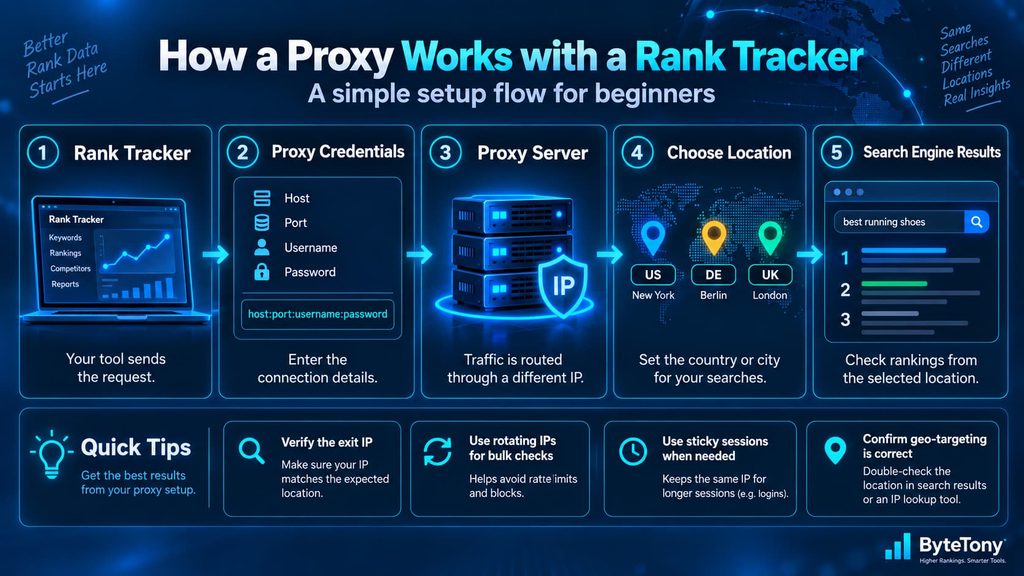
1. Get your proxy credentials
A provider will normally give you information such as:
- Host or endpoint
- Port
- Username
- Password
A proxy may appear in a format similar to:
host:port:username:password
Some providers also let you authorize your own IP address instead of using username/password credentials.
2. Find your rank tracker’s proxy settings
Look for sections named:
- Settings
- Network
- Proxy
- Advanced
- Connections
Enter the endpoint and authentication information provided by your proxy service.
If your rank tracker has no proxy configuration at all, it may be a hosted product that handles data collection itself.
In that case, you probably don’t need to buy a proxy separately.
3. Choose rotating or sticky sessions
Rotating sessions change the exit IP automatically.
They are usually the logical starting point for batches of independent rank checks.
Sticky sessions attempt to keep the same IP for a set period.
They are useful when multiple requests need to belong to the same session.
For ordinary independent keyword checks, rotation is usually simpler.
4. Configure location targeting
Location is one of the most important settings in rank tracking.
A query from New York can produce different results from the same query in Los Angeles, Berlin, London, or Riyadh.
Depending on your provider, location may be selected:
- In the dashboard.
- Through the username.
- Through an endpoint.
- Through an API parameter.
Do not assume that buying residential proxies automatically gives you the correct city.
You still need to configure geo-targeting.
5. Verify the exit IP
Before running hundreds of keywords, send a test request through the proxy and check the exit IP using an IP lookup service.
Confirm:
- The proxy is connected.
- The country is correct.
- The city is reasonably close when city targeting is required.
- Your real IP is not being used unexpectedly.
Then test a small batch of keywords before scaling up.
6. Control your request rate
A better proxy does not mean you should send unlimited requests as quickly as possible.
Aggressive automation can still trigger:
- Rate limits.
- CAPTCHAs.
- Temporary blocks.
- Failed requests.
Start conservatively and increase volume gradually.
Common Beginner Proxy Mistakes
Buying residential proxies when you don’t need proxies at all
This is the most expensive mistake.
If your hosted SEO platform already collects rankings, a separate proxy adds cost and complexity without solving a real problem.
Choosing the cheapest advertised price
“From $1.30/GB” may mean buying hundreds or thousands of gigabytes.
Always compare the smallest realistic purchase, not the largest-volume headline rate.
Forgetting about geo-targeting fees
A cheap country-level proxy can become much more expensive when you add city or ZIP targeting.
DataImpulse is a good example: advanced target filters are billed at double the standard residential rate.
Loading unnecessary images and scripts
Residential proxies usually charge by bandwidth.
If your rank-tracking software downloads every image, font, video, and JavaScript resource on a SERP, you can consume significantly more traffic than necessary.
Using public free proxies
A legitimate free plan from an established provider is very different from a random list of anonymous IP addresses found online.
Use the first. Avoid the second.
Forgetting to cancel trials
Some trials automatically activate the selected paid plan when the trial period ends.
Read the terms before starting and create a reminder if necessary.
How Much Do Proxies for Rank Tracking Cost?
Proxy providers generally use three pricing models.
Per GB
This is common with rotating residential proxies.
Examples include:
- Decodo
- IPRoyal
- DataImpulse
- SOAX
- Proxy-Seller
- Webshare residential proxies
Your cost depends on how much bandwidth your rank tracker consumes.
Per IP
Datacenter and ISP proxies are frequently rented by IP.
This can make sense when you need a fixed group of addresses rather than a large rotating residential pool.
Per result or request
Managed scraping APIs such as Oxylabs may charge according to successful results or requests instead of raw proxy bandwidth.
This shifts much of the infrastructure work to the API provider.
Estimating Residential Proxy Bandwidth
Don’t assume that every SERP check consumes the same amount of data.
Bandwidth depends on:
- Whether images are loaded.
- Whether JavaScript is rendered.
- How much HTML the search engine returns.
- How many pages your tracker checks.
- Whether the software retries failed requests.
The safest approach is to measure it.
Run a small batch — for example 50 or 100 keyword checks — and look at the bandwidth used in your provider dashboard.
Then calculate:
Average bandwidth per check × total monthly checks = estimated monthly bandwidth
For example, suppose your measured workflow consumes approximately 0.5 MB per SERP check.
If you track 200 keywords every day:
200 × 30 = 6,000 checks
At an illustrative 0.5 MB each:
6,000 × 0.5 MB = roughly 3,000 MB
That is approximately 3 GB of traffic.
At $1/GB, your proxy bandwidth would be around $3.
At $4/GB, it would be around $12.
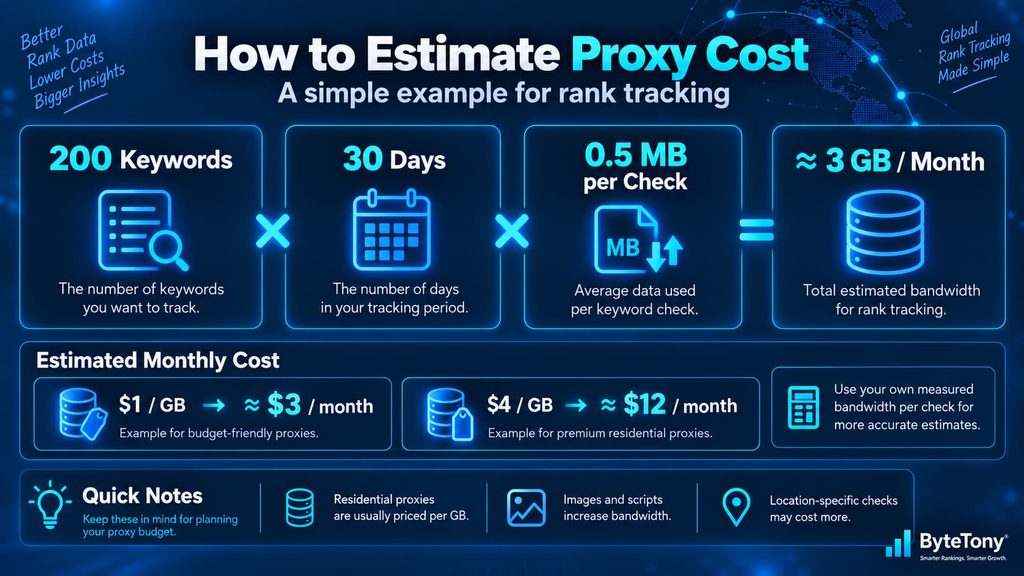
The 0.5 MB figure is only an example — measure your own software before budgeting.
My Recommendation
There is no single best proxy service for everyone.
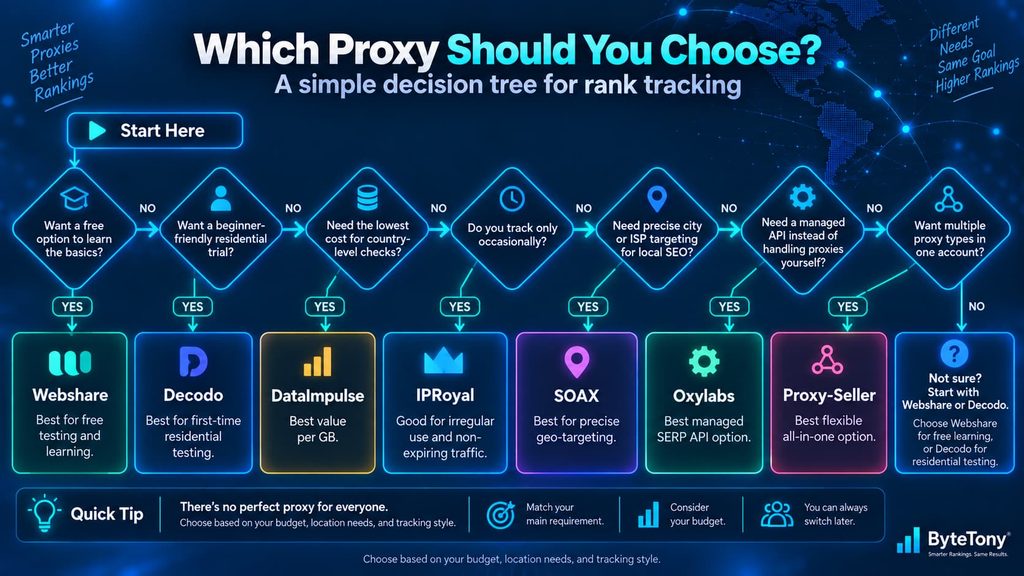
Best free option: Webshare
Use Webshare if you have never configured a proxy before and want to learn without spending money.
Its free datacenter tier is excellent for testing the mechanics.
Just don’t assume the free datacenter proxies will behave exactly like paid residential IPs.
Best beginner residential option: Decodo
Decodo is my first choice for a beginner who wants to test a real residential proxy with minimal commitment.
The 3-day residential trial makes it easier to confirm that your rank tracker works correctly before purchasing traffic.
Remember that the selected paid plan can activate after the trial unless you cancel.
Best value for country-level tracking: DataImpulse
If price is your main concern, DataImpulse’s $1/GB standard residential plan is difficult to beat.
It becomes less compelling when you need state, city, ZIP, or ASN targeting because advanced filters are billed at double the standard rate.
Best for occasional projects: IPRoyal
If you buy traffic for occasional audits instead of continuous monitoring, IPRoyal’s non-expiring residential traffic can be more valuable than the lowest headline per-GB price.
Best for local SEO: SOAX
Choose SOAX when precise location targeting is important enough to justify the higher minimum monthly spend.
Best when proxies become too much work: Oxylabs
If maintaining endpoints, rotation, retries, blocks, and parsers starts consuming too much development time, a managed SERP API may be the better solution.
Best flexible multi-proxy option: Proxy-Seller
Proxy-Seller makes sense if you want residential, ISP, datacenter, and mobile proxies available from the same provider.
The small residential plan is also far more accessible than the “from $1.30/GB” bulk pricing might suggest.
ByteTony readers can use BYTETONY15 for 15% off when purchasing through Proxy-Seller.
Frequently Asked Questions
Are free proxies safe for SEO tools?
It depends on what “free proxy” means.
A free tier from an established provider such as Webshare is very different from an anonymous public proxy list.
Public proxy lists may contain unreliable or poorly managed servers operated by unknown parties.
For anything involving accounts, credentials, or important projects, use a reputable provider.
Will Google ban my website if I use a proxy to check rankings?
A proxy request is made from the proxy’s IP address, so blocks and rate limits usually affect the requesting infrastructure rather than the website whose ranking you are checking.
However, automated Google queries can violate Google’s policies and Terms of Service regardless of which proxy is used.
A proxy is a networking tool, not a way to make prohibited automation compliant.
Do I need a proxy for Ahrefs or Semrush?
Normally, no.
Hosted platforms such as Ahrefs and Semrush collect ranking data using their own infrastructure.
You do not need to purchase residential proxies simply to use their normal rank-tracking features.
Proxies become relevant when you operate software that sends search-engine requests directly from your own computer or server.
Are residential proxies better than datacenter proxies for SEO?
For targets that closely monitor IP reputation and origin, residential proxies generally have a lower detection risk because their IP addresses are associated with consumer internet connections.
Datacenter proxies remain useful when speed and cost are more important than appearing to originate from a residential network.
Should I use rotating or sticky proxies for rank tracking?
For independent keyword checks, rotating residential proxies are usually the simpler choice.
Sticky sessions are more useful when several requests must remain connected to the same identity or session.
Can I use the same proxy pool for multiple websites?
Yes, technically.
With a rotating residential pool, requests for multiple projects may already be distributed across many exit IP addresses.
The more important issue is organization and geo-targeting. Make sure each project’s keywords use the correct country, city, language, device, and search settings.
Final Thoughts
The best proxy for rank tracking is not necessarily the provider with the largest network or the lowest advertised bulk price.
Start by asking whether you need a proxy at all.
If your hosted SEO tool already gathers rankings for you, avoid adding another layer of cost and complexity.
If you do need your own proxy infrastructure:
- Start with Webshare if you want a free environment for learning.
- Try Decodo if you want an easy residential trial.
- Choose DataImpulse when low-cost country-level residential traffic is your priority.
- Use IPRoyal for irregular projects where non-expiring traffic matters.
- Consider SOAX for serious local SEO and precise location targeting.
- Move toward Oxylabs when maintaining proxies yourself stops being worth the effort.
- Consider Proxy-Seller when you want multiple proxy types under one account and flexible entry pricing.
Most beginners should start small.
Test a handful of keywords, measure bandwidth consumption, verify location accuracy, and make sure the proxy actually solves a problem before buying a larger plan.
A cheap proxy you don’t need is still wasted money.
Enjoyed this guide? Support ByteTony and help us create more simple, beginner-friendly tech guides.
☕ Support ByteTony