One of the easiest ways for a beginner to waste money on proxies is to choose the cheapest option without checking whether it actually fits the job.
IPv6 proxies are a perfect example. Proxy-Seller sells them for as little as a few cents per IP, which can look almost too good to pass up. But if the website you want to access does not support IPv6, those proxies may be useless for that target.
That is why this Proxy-Seller review focuses less on finding the absolute cheapest proxy and more on helping beginners choose the right proxy type.
Proxy-Seller has operated since 2014 and offers five main proxy categories: IPv4 datacenter, IPv6, ISP, residential, and mobile proxies. Its residential network covers more than 220 locations, while its static products are sold in smaller packages that make them accessible to individual users.
This review is mainly for:
- Bloggers checking rankings in different countries
- Freelancers collecting modest amounts of public web data
- Marketers testing regional pages or ads
- Creators managing international workflows
- Beginners buying proxies for the first time
It is not aimed at large data teams looking for fully managed scraping infrastructure.
The short version is simple:
Proxy-Seller is attractive if you want affordable raw proxy access and are comfortable managing the actual workflow yourself.
What you do not get is a managed system that automatically handles every block, retry, CAPTCHA, or failed request for you.
Note: This article may contain affiliate links. If you buy through them, we may earn a small commission at no extra cost to you.
Table of Contents
Proxy-Seller Review: Quick Verdict
Best for: beginners and small users who want affordable IPv4 or ISP proxies for SEO monitoring, regional testing, light public-data collection, and similar tasks.
Less suitable for: users who expect a proxy provider to automatically solve CAPTCHAs, retry blocked requests, or handle sophisticated anti-bot systems.
Current Entry Pricing
| Proxy type | Starting price | Billing model |
|---|---|---|
| IPv4 datacenter | From $0.49/IP | Per IP |
| IPv6 | From $0.02/IP | Per IP |
| ISP | From $0.98/IP | Per IP |
| Residential | $3.50/GB pay as you go | Per GB |
| Mobile | From $10/IP | Per IP |
Proxy-Seller also currently offers a 3-day residential trial for $1.99. It is a paid trial rather than a general free trial.
Prices checked September 2026. Proxy pricing changes frequently, so always check the current checkout price before purchasing.
Editorial Rating: 4/5
For the type of beginner covered by this review, I would give Proxy-Seller 4 out of 5.
That rating is based on published pricing, product features, documentation, and policies. I did not independently benchmark the proxy network for this review.
The main strengths are low entry prices, several proxy types in one account, small starting orders, and flexible protocols.
The main weakness is that Proxy-Seller gives you the proxy infrastructure but leaves most of the difficult request-management work to you.
If that trade-off fits your needs, you can check current Proxy-Seller pricing and locations here.
What Is Proxy-Seller?
A proxy server acts as an intermediary between your device or application and a website.
Instead of connecting directly to a target website, your request first goes through the proxy. The destination sees the proxy’s IP address rather than your normal IP address.
A simple example is local SEO research.
Imagine you are in one country but want to check how search results appear to someone in Germany. Using a German proxy can help your SEO software or testing workflow make requests from a German IP rather than your normal location.
That does not automatically make every result identical to what every German user sees — search engines use many signals — but location-specific IPs are useful for regional SERP monitoring and testing.
Proxy-Seller sells the underlying IP addresses and connection infrastructure for these kinds of tasks.
The service supports commonly used HTTP, HTTPS, and SOCKS5 connections, along with username/password authentication and IP allowlisting.
The important distinction is this:
Proxy-Seller is primarily a proxy provider, not a complete managed web-unblocking platform.
You still need to choose the appropriate proxy type and configure whatever browser, SEO tool, scraper, or application will use it.
If your main interest is SEO rather than proxy infrastructure itself, our guide to the best free SEO tools for bloggers covers tools you can use alongside your proxy setup.
Creators whose main goal is producing content rather than regional testing may also find our guide to the best AI tools for content creators more useful.
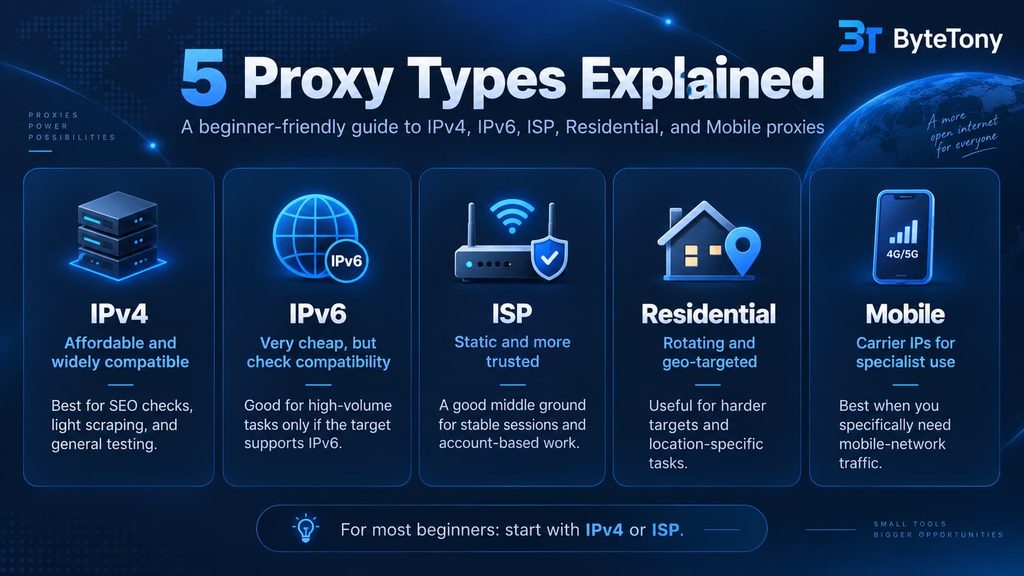
The 5 Proxy Types Explained
Choosing the correct proxy type matters more than choosing the lowest advertised price.
Here is what each Proxy-Seller option is actually suited for.
IPv4 Datacenter Proxies
IPv4 datacenter proxies are static IP addresses hosted on datacenter infrastructure.
Proxy-Seller lists IPv4 pricing from $0.49 per IP, although your actual price depends on location, quantity, and rental duration.
Best for
IPv4 proxies make sense for tasks such as:
- SEO monitoring
- SERP checking
- Regional QA
- Public-data collection from relatively accessible websites
- Automation where low cost per IP matters
They also have one major advantage over IPv6:
IPv4 has much broader compatibility.
If you are unsure what your target supports, IPv4 is generally the safer starting point.
Main disadvantage
Datacenter IP ranges are easier for websites to identify than residential or ISP addresses.
Websites with strict anti-bot systems may therefore block or challenge datacenter traffic more aggressively.
For beginners doing light SEO monitoring or accessing uncomplicated public pages, however, IPv4 is often the most practical place to start.
If rank tracking is your main use case, see our full comparison of the best proxies for rank tracking and SERP checks before choosing a provider.
IPv6 Proxies
Proxy-Seller’s IPv6 proxies start from $0.02 per IP, making them by far the cheapest option per address.
They also include unlimited bandwidth and are designed for high-volume operations.
That price can be tempting, but there is an important limitation.
Your target must support IPv6
Proxy-Seller states that its IPv6 proxies do not convert an IPv4-only destination into IPv6 compatibility.
If a website only accepts IPv4 connections, buying hundreds of inexpensive IPv6 addresses will not solve the problem.
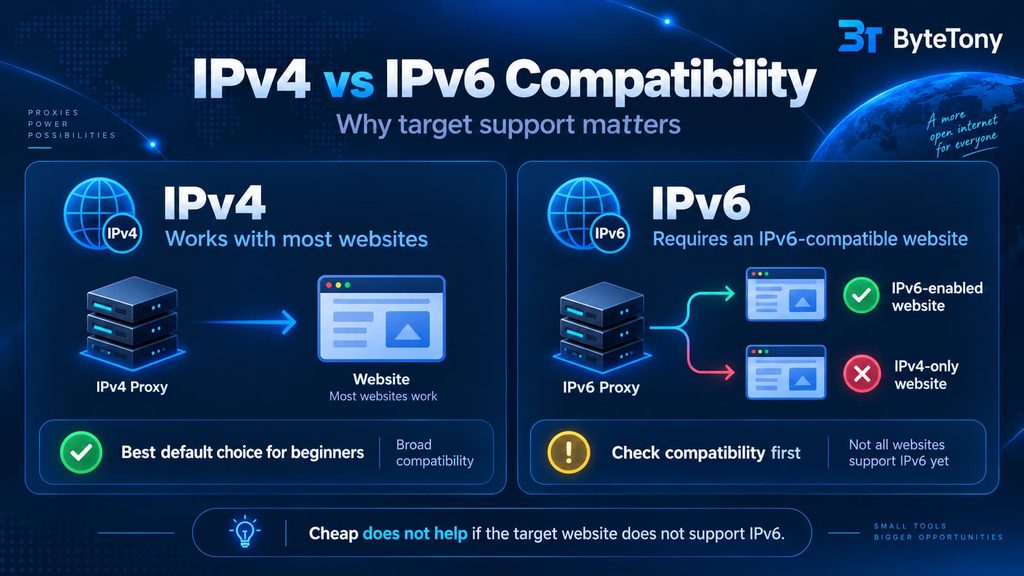
Before buying IPv6 proxies, verify that the actual target you plan to use supports IPv6.
One basic way is to check whether the target domain publishes an IPv6 AAAA DNS record and, ideally, confirm that it is genuinely reachable over an IPv6 connection.
Do not confuse that with Proxy-Seller’s free Proxy-Check tool.
Proxy-Check checks a proxy address you already have. It does not test whether an arbitrary website supports IPv6 before you buy a proxy.
Best for
Choose IPv6 when:
- You have confirmed your target supports IPv6
- You need many addresses
- Cost per IP is extremely important
- Your workload involves modern IPv6-compatible platforms
If you have not confirmed compatibility, IPv4 is the safer choice.
ISP Proxies
ISP proxies sit between datacenter and residential proxies.
They are static IP addresses associated with internet service providers while retaining much of the speed and stability associated with datacenter-hosted infrastructure.
Proxy-Seller currently lists ISP proxies from $0.98 per IP.
For many beginners, this may be the most interesting product in the entire lineup.
Best for
ISP proxies can make sense when you need:
- A stable IP for a longer session
- Better IP reputation than ordinary datacenter proxies
- Regional testing
- Advertising QA
- Consistent account or business workflows
- Predictable per-IP pricing
Unlike rotating residential proxies, ISP proxies are billed per IP rather than per gigabyte.
That makes costs easier to understand if your workflow transfers a lot of data.
Main disadvantage
They cost more than basic datacenter IPs, and location options can depend on inventory.
For tasks where country-level location is sufficient and you want one consistent identity, however, ISP proxies offer a useful middle ground.
For many first-time buyers, I would compare a small IPv4 package with a small Proxy-Seller ISP package before looking at residential or mobile products.
Residential Proxies
Residential proxies route traffic through IP addresses associated with real residential networks.
Proxy-Seller currently lists a pool of more than 47 million IPs across 220+ locations, with targeting that can include country, region, city, and ISP.
Unlike the static products, residential proxies are billed by traffic.
Current public pricing includes:
| Traffic | Price | Effective price |
|---|---|---|
| Pay as you go | $3.50 for 1 GB | $3.50/GB |
| 3 GB | $9 | $3.00/GB |
| 10 GB | $25 | $2.50/GB |
| 25 GB | $60 | $2.40/GB |
| 50 GB | $115 | $2.30/GB |
| 100 GB | $220 | $2.20/GB |
Larger custom or enterprise volumes may receive lower rates.
Best for
Residential proxies are more appropriate when:
- Datacenter proxies are being blocked
- You need a broad selection of locations
- You need rotating IPs
- You need city or ISP targeting
- You are collecting public data from more restrictive sites
Proxy-Seller lets residential users rotate IPs by request, by time interval, or use sticky sessions.
Main disadvantage
Bandwidth-based pricing is harder for beginners to predict.
If you do not know how much traffic your application transfers, a cheap-looking per-GB plan can become harder to budget than a fixed number of static IPs.
That is why I would not automatically start with residential proxies simply because they have a stronger reputation.
Try to match the product to the problem instead.
Mobile Proxies
Mobile proxies use IPs associated with real cellular networks such as 4G and 5G connections.
Proxy-Seller lists mobile pricing from $10 per proxy, with rotation controls depending on the product configuration.
These addresses typically cost significantly more than datacenter or ISP proxies.
Best for
Mobile proxies are most relevant when you specifically need:
- Mobile-network traffic
- Mobile app or website testing
- Carrier-specific regional verification
- A workflow where normal datacenter or ISP addresses are unsuitable
Main disadvantage
Price.
A beginner performing basic SEO checks, general geo-testing, or light public-data collection usually does not need to begin with mobile proxies.
They are better treated as a specialist option rather than the default premium choice.
Proxy Type Comparison
| Proxy type | Billing | Best for | Main limitation |
|---|---|---|---|
| IPv4 datacenter | Per IP | SEO, testing, light automation | Easier for sites to identify as datacenter traffic |
| IPv6 | Per IP | High-volume IPv6-compatible workloads | Cannot reach IPv4-only targets |
| ISP | Per IP | Stable sessions, regional QA, consistent workflows | More expensive than datacenter |
| Residential | Per GB | Rotating access, precise geo-targeting, harder targets | Traffic costs can be difficult to predict |
| Mobile | Per IP | Mobile-specific testing and specialist workflows | Expensive for ordinary use |
For most beginners, I would start the decision with IPv4 vs ISP, not residential vs mobile.
Proxy-Seller Pricing: What Beginners Should Know
Proxy-Seller essentially uses two main pricing models.
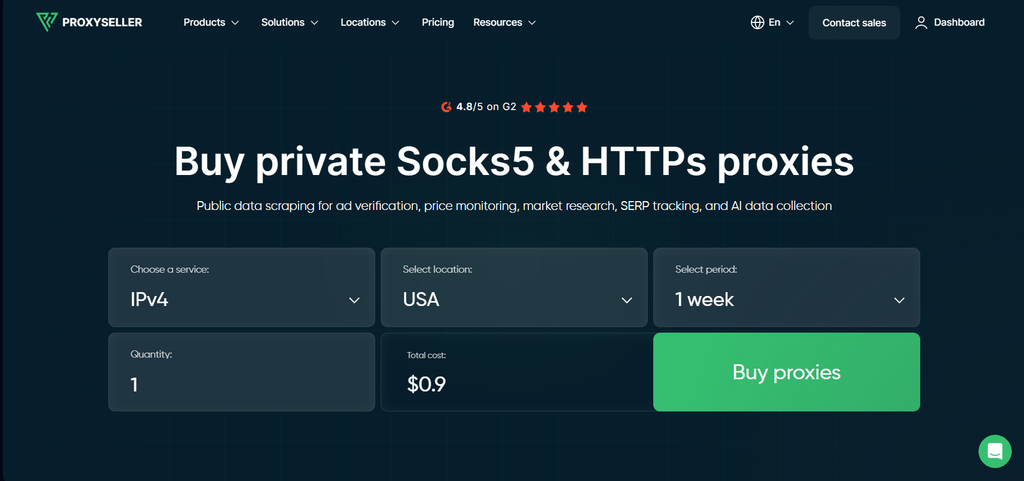
Per-IP pricing
IPv4, IPv6, ISP, and mobile products are primarily sold based on the number of proxy IPs and rental period.
The exact cost can change based on:
- Country
- Number of proxies
- Rental length
- Current discounts
Rental periods can include short options such as one or two weeks as well as longer monthly commitments.
For a first purchase, a short rental period is usually safer than immediately paying for many months.
You can always scale after confirming the proxies work for your actual use case.
Per-GB pricing
Residential proxies are different.
You pay based on the amount of transferred data rather than owning access to a fixed number of addresses.
The smallest paid residential test is currently a $1.99 three-day trial, which is limited by both time and traffic.
That makes it useful for checking the dashboard, integration, location targeting, and your real workflow before committing to a larger plan.
Refunds: Read the Policy Before Buying
The refund policy deserves more attention than a simple “24-hour guarantee” description.
Proxy-Seller’s current return policy includes several conditions depending on what you purchase and why you are requesting a refund.
It states that full refunds can be claimed within a specified period in certain cases such as an unusable proxy that cannot be replaced, inability to connect after technical confirmation, or lack of the required location.
However, shorter products have additional restrictions. For example, weekly products generally lose standard refund eligibility after the first 24 hours, and the paid three-day residential trial is generally non-refundable.
The safest approach is therefore simple:
Test your proxies as soon as you receive them.
Do not wait several days before discovering that your location or target does not work as expected.
Setting Up Proxy-Seller
The basic setup is straightforward.
When buying a proxy, you normally choose:
- Proxy type
- Location
- Quantity or traffic allowance
- Rental period
- Authentication method
- Payment method
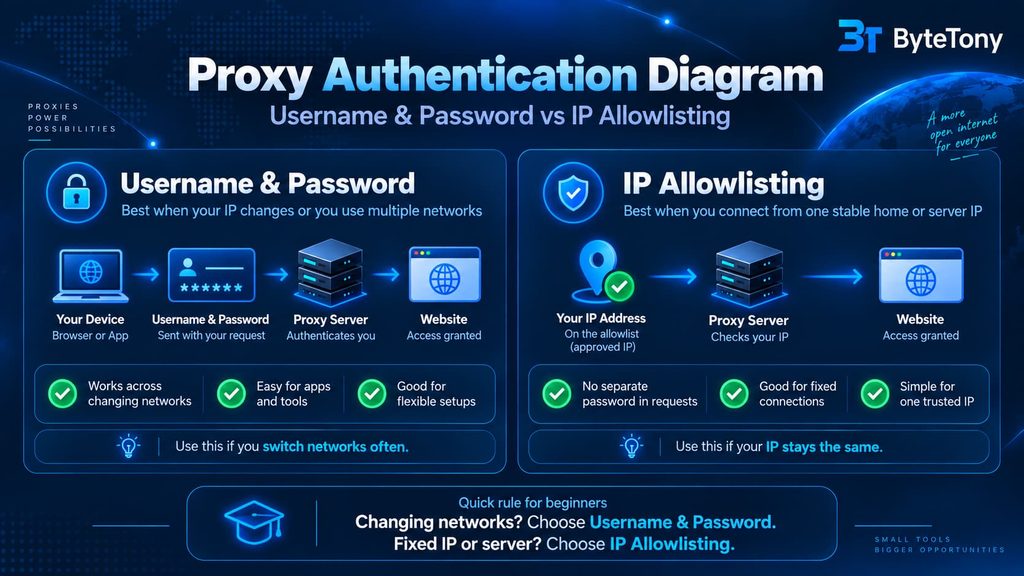
The two common authentication options are:
Username and Password
Your proxy connection uses credentials supplied by the service.
This is convenient when your own internet IP changes or when you need to configure the proxy inside different supported applications.
IP Allowlisting
You authorize your own IP address with Proxy-Seller.
Connections from that approved IP can then use the proxy without repeatedly entering a separate proxy password.
This works best when you connect from a stable server or fixed network.
Whichever method you use, store your proxy credentials securely. If you are not already using a password manager, our beginner guide explains how to set up a password manager safely.
Free Tools
Proxy-Seller also offers several browser-based utilities, including:
- Proxy-Check
- Port Scanner
- Ping-IP
- My IP
- IP-Trace
These tools are useful, but they should not be mistaken for a free trial of the paid proxy network.
What Proxy-Check actually does
Proxy-Check lets you test proxy addresses you already have.
It can help determine whether a proxy is working and provide information about the connection.
It does not let you enter any website and determine in advance whether that site will work with a Proxy-Seller IPv6 proxy.
That distinction matters.
If IPv6 compatibility is the deciding factor, check the target itself for IPv6 support before purchasing.
Published Performance and Real-World Use Cases
Proxy-Seller publishes figures including approximately 99.7% uptime and 99.5%+ connection success across parts of its service.
Those are vendor-published figures, not independent measurements from ByteTony.
I did not run a controlled benchmark for this review, so it would be misleading to present them as independently verified performance.
What we can evaluate more confidently is how the different proxy types fit common beginner workflows.
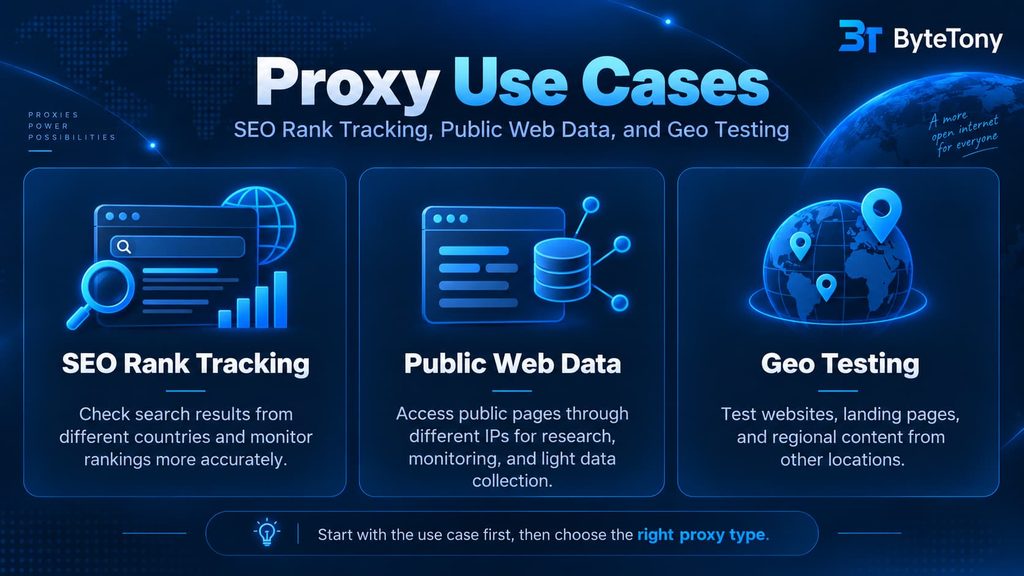
SEO and Rank Tracking
This is one of the clearest uses for inexpensive proxies.
If you need to monitor search results from multiple countries, location-specific proxies can help your rank-tracking workflow make requests from the markets you care about.
For modest workloads, IPv4 datacenter proxies are usually the first option worth trying.
You do not automatically need expensive residential or mobile addresses just because you are working with Google.
Start simple and only upgrade if your actual tool or target requires it.
For a more detailed provider comparison specifically for SEO, read our guide to the best proxies for rank tracking and SERP checks.
Public Web Data Collection
Basic datacenter proxies can work well when collecting modest amounts of publicly accessible information from websites that do not aggressively filter automated traffic.
However, buying proxies does not make blocking disappear.
A website may still:
- Rate-limit requests
- Display CAPTCHAs
- Detect datacenter networks
- Reject unusual request patterns
- Restrict automated access in its terms
Proxy-Seller does not automatically solve all of those issues for you.
If a target blocks datacenter addresses, residential proxies may provide a different network profile, but they still do not turn a poorly designed collection workflow into an unrestricted one.
Always respect applicable laws, website terms, robots rules where relevant, and reasonable request limits.
Geo-Testing
Proxies are also useful for checking regional experiences.
Examples include:
- Testing landing pages from another country
- Checking regional product availability
- Verifying localized content
- Reviewing region-specific advertising
- Comparing public pages across markets
For ordinary country-level testing, IPv4 or ISP proxies are usually more economical than residential or mobile products.
Residential makes more sense when you specifically need finer targeting such as city or ISP selection.
Pros and Cons
Pros
- Five major proxy categories from one provider
- Very low IPv4 and IPv6 entry prices
- ISP proxies available for users needing static residential-style IPs
- Small starting orders
- Residential targeting across 220+ locations
- Residential rotation and sticky-session controls
- HTTP, HTTPS, and SOCKS5 support
- Username/password and IP allowlist authentication
- API and developer documentation
- Free proxy diagnostic tools
- 24/7 support
- Operating since 2014
- Published ISO/IEC 27001 and ISO 9001 certifications
Cons
- No broad free trial for beginners
- Residential trial costs $1.99 and has limitations
- Refund rules vary by product and situation
- No automatic solution to every CAPTCHA or anti-bot challenge
- IPv6 can be a bad purchase if your target does not support it
- Residential per-GB billing can be harder to budget
- Mobile proxies are expensive for ordinary beginner workloads
- Advanced workflows still require technical configuration
Alternatives to Proxy-Seller
Proxy-Seller is not the only reasonable option.
These four competitors are worth considering depending on what you actually need.
Webshare
Webshare has the easiest zero-cost entry point in this comparison.
Its current free plan includes:
- 10 datacenter proxies
- 1 GB of traffic per month
- No credit card requirement
- No expiry on the free proxies
Paid basic datacenter plans currently start at $2.99 per month for 100 proxies.
The disadvantage is that the free addresses are datacenter proxies and are shared, so they will not suit every target.
Still, if your goal is simply to learn how proxy configuration works without spending anything, Webshare is one of the best places to start.
IPRoyal
IPRoyal is another budget-friendly provider with residential, ISP, datacenter, and mobile options.
Its small-volume residential pricing is currently much higher than the headline bulk rate — for example, a small subscription starts around $7/GB, while the widely advertised $1.75/GB figure applies to very large volumes.
One particularly useful feature is that purchased residential traffic does not expire.
That can be attractive if you use proxies occasionally rather than consuming a fixed allowance every month.
Oxylabs
Oxylabs targets a more business-oriented audience.
Its current residential starter plan is 5 GB for $30, or $6/GB.
Shared ISP plans currently start at 10 IPs for $16 per month, while dedicated ISP pricing is higher.
Oxylabs also offers broader scraping and data-collection products beyond raw proxy access.
For a solo beginner, that may be more infrastructure than necessary, but it becomes more relevant as projects become larger or more demanding.
Bright Data
Bright Data is one of the broadest platforms in this category.
In addition to residential, ISP, datacenter, and mobile proxy networks, it offers managed data-collection and web-unblocking products.
Its residential network currently shows promotional pay-as-you-go pricing of around $4/GB, with the standard price displayed as higher, and free trials are available.
Because promotional pricing can change quickly, check the current rate directly before comparing it with Proxy-Seller.
Bright Data makes more sense when you want a wider data platform rather than simply inexpensive static IP addresses.
Proxy-Seller vs Alternatives
| Provider | Strongest reason to choose it | Free option | Beginner fit |
|---|---|---|---|
| Proxy-Seller | Low-cost static IPv4/IPv6/ISP options | No general free plan; paid residential trial | Good |
| Webshare | Learn with 10 free datacenter proxies | Yes | Excellent |
| IPRoyal | Flexible residential traffic that does not expire | No permanent general free plan | Good |
| Oxylabs | Larger business and data-collection infrastructure | Trials available for selected products | Moderate |
| Bright Data | Advanced proxy and managed data tools | Free trials available | Moderate |
Pricing and offers checked September 2026. Promotions and proxy pricing can change, so verify current rates before purchasing.
My Recommendation
If you are buying proxies for the first time, do not start by asking:
Which proxy is cheapest?
Start with:
What exactly am I trying to do?
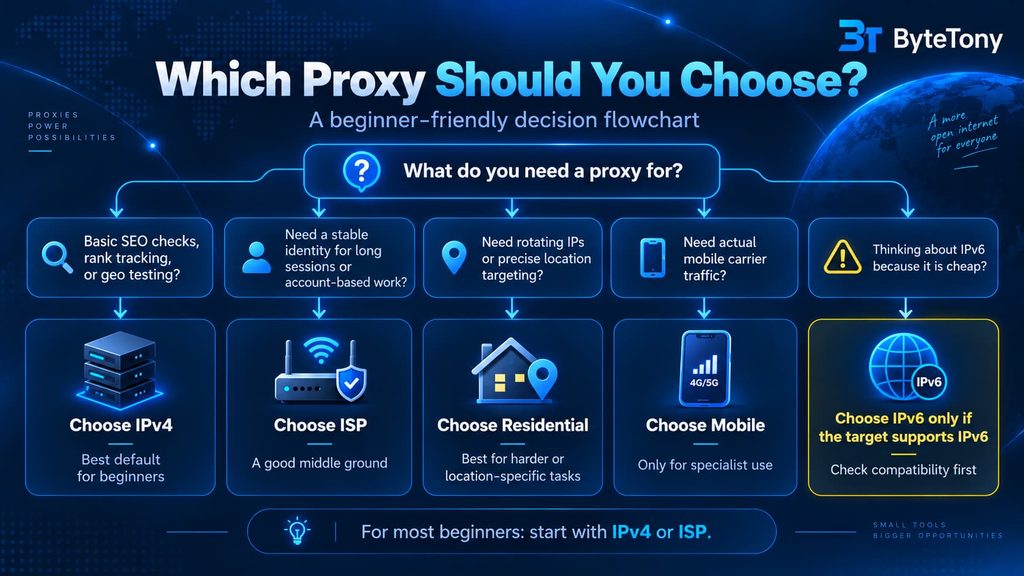
For SEO rank tracking, regional QA, or light access to ordinary public pages, I would begin with a small IPv4 package.
If you need a static IP with a stronger ISP-style network identity, compare a small ISP package.
Use residential proxies when you specifically need rotation, detailed geo-targeting, or when cheaper datacenter options do not fit the target.
Use mobile proxies only when your workflow genuinely requires mobile-carrier traffic.
And only choose IPv6 after confirming that your target supports IPv6.
Best option for most beginners
IPv4 or ISP.
They are easier to budget and easier to understand than per-GB residential pricing.
Cheapest option
IPv6, but only when your target supports it.
A two-cent proxy that cannot connect to your target is not actually cheap.
Best option for difficult geo-targeted workflows
Residential, especially when city or ISP targeting and IP rotation matter.
Best way to learn for free
If you simply want to experiment with proxy configuration before paying, Webshare’s permanent free datacenter tier is more beginner-friendly than paying for a Proxy-Seller package immediately.
Frequently Asked Questions
Does Proxy-Seller have a free trial?
There is no general free proxy trial shown across its main products.
Proxy-Seller currently offers a paid 3-day residential trial for $1.99, limited by time and traffic.
The trial is useful for testing the residential service before buying a larger traffic plan.
Is Proxy-Seller good for SEO?
It can be.
IPv4 and residential proxies can both be useful in SEO workflows such as regional SERP monitoring, depending on your rank-tracking software and request volume.
If SEO is your main goal, compare providers in our best proxies for rank tracking and SERP checks guide rather than choosing only on price.
Should I buy IPv4 or IPv6 proxies?
Choose IPv4 if you want maximum compatibility.
Choose IPv6 if you have already confirmed your target supports IPv6 and you need a large number of inexpensive addresses.
Do not select IPv6 purely because it is cheaper.
Are residential proxies better than datacenter proxies?
Not automatically.
Residential proxies generally offer stronger location options and a network profile closer to ordinary consumer connections.
Datacenter proxies are usually faster, cheaper, and perfectly adequate for many basic tasks.
The better option depends on the target and your workload.
How many proxies do I need?
There is no universal number.
For a small SEO or testing workflow, start with the minimum number that covers the locations you actually need.
Buying hundreds of IPs before confirming that your target and software work correctly is unnecessary.
Start small, test, and scale only when request volume or location coverage requires it.
Does Proxy-Seller automatically solve CAPTCHAs?
Do not assume so.
Proxy-Seller provides proxy infrastructure. Your target website may still challenge, block, or rate-limit requests.
If your workflow requires automated unblocking or CAPTCHA handling, compare managed data-collection services rather than assuming a raw proxy provider will handle everything automatically.
Are proxies legal?
Using a proxy is legal in many jurisdictions, but what you do through the proxy still matters.
A proxy does not give permission to access private data, bypass authentication, violate applicable laws, or ignore a website’s rules.
Use proxies for legitimate purposes and check the laws and terms that apply to your specific activity.
Final Verdict
Proxy-Seller makes the most sense for beginners who want affordable, configurable proxy infrastructure without paying enterprise prices.
Its strongest advantage is choice.
You can begin with inexpensive IPv4 proxies, move to ISP addresses if you need a more suitable static network profile, use residential traffic when rotation and precise geo-targeting matter, and move to mobile only for specialist situations.
The downside is equally clear:
You are buying proxy access, not a complete managed solution.
You still need to choose the right product, configure it correctly, test your real target, monitor failures, and follow the rules that apply to your workflow.
For a blogger checking rankings, a freelancer performing modest public-data work, or a creator testing regional experiences, that trade-off can be perfectly reasonable.
My recommendation is to keep your first order small.
Start with IPv4 or ISP unless you already know why you need something else, test it against your real workflow immediately, and only scale after it works.
If Proxy-Seller fits your needs, you can check the latest Proxy-Seller plans and locations here.
You can also try promo code BYTETONY15 at checkout for 15% off.
The cheapest proxy is not the one with the smallest number beside it.
It is the one that actually works for the task you bought it for.
Enjoyed this guide? Support ByteTony and help us create more simple, beginner-friendly tech guides.
☕ Support ByteTony