Last verified: August 2026
Most lists of “free SEO tools” are written for websites that already have traffic, rankings, and months of data.
That is not very helpful when you have published six posts, Google Search Console looks almost empty, and you are still trying to figure out what you should work on next.
This guide takes a different approach.
Instead of ranking SEO tools by popularity, I have organised the best free SEO tools for bloggers in the order a new blogger can actually use them:
- Connect your site to the search engines.
- Find topics and keywords worth targeting.
- Optimise the post itself.
- Check for technical problems.
- Review what is working and repeat.
You do not need all of these tools on day one. In fact, signing up for everything at once is one of the easiest ways to waste time.
Start with the first tool on this list, publish useful content, and add the others when you actually need them.
Note: This article may contain affiliate links. If you buy through them, we may earn a small commission at no extra cost to you.
Table of Contents
How I Chose These Free SEO Tools
A tool had to pass three basic tests to make this list.
It has to be genuinely usable without paying
A limited free plan is fine. A tool that only gives you a seven-day trial is not.
One exception worth understanding is Google Keyword Planner. Using the tool does not require you to run a paid advertising campaign, but Google currently requires billing information when completing Google Ads account setup.
I will explain that catch when we get to it.
It has to be useful before you have much traffic
A sophisticated rank tracker is not particularly useful when your new blog gets three impressions a day.
The tools below can help even when your site is small.
Its limitations should be clear
Free plans change constantly.
Where a limit is easy to verify, I include it. Where vendors change limits frequently or documentation is inconsistent, I would rather tell you to check the current plan than give you a number that may already be wrong.
Step 1: Connect Your Blog to the Search Engines
1. Google Search Console
If you install only one SEO tool from this entire list, make it Google Search Console.
Search Console is Google’s free platform for website owners. It helps you understand:
- Which search queries are generating impressions for your site
- Which pages appear in Google Search
- Whether Google has indexed a URL
- Which pages are getting clicks
- Whether Google has discovered problems affecting your pages
- How your site’s search visibility changes over time
For a new blog, this is far more valuable than staring at keyword difficulty scores.
Search Console uses data from your actual website.
Most third-party SEO tools estimate what might be happening. Search Console tells you what Google is actually recording for your property.
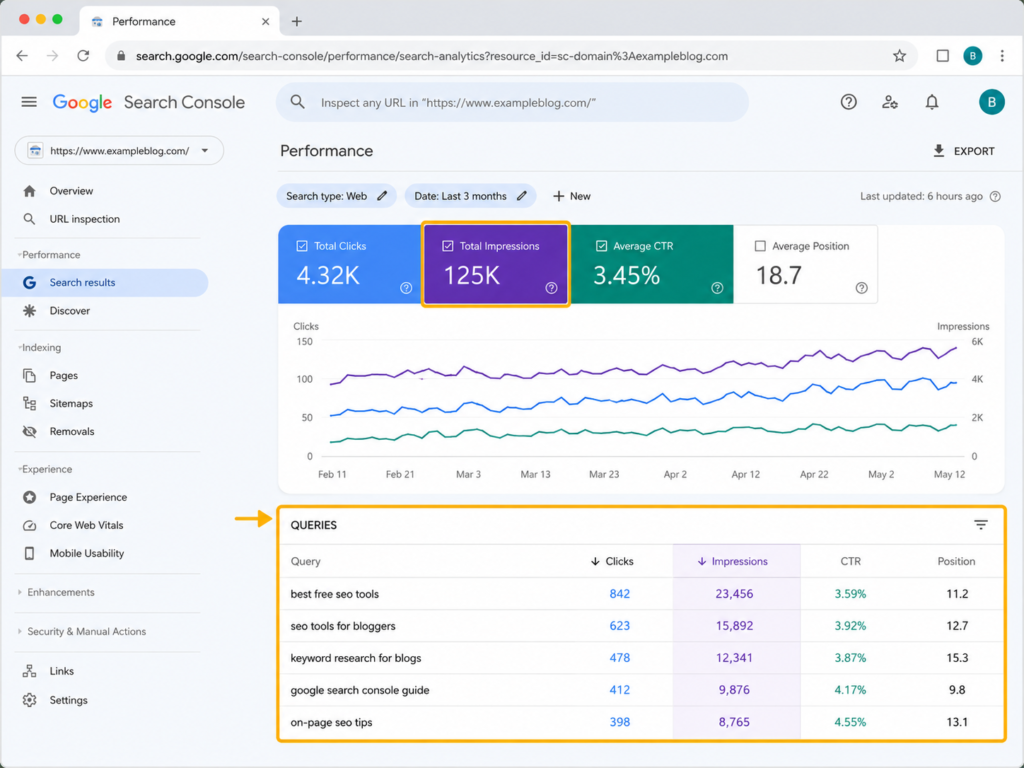
The report beginners should watch
Open the Performance report and pay attention to:
- Impressions
- Clicks
- Click-through rate
- Average position
- Queries
- Pages
Do not become obsessed with the exact average-position number. Position is an average across different searches, devices, locations, and situations.
Instead, look for patterns.
For example, suppose an article receives very few clicks but keeps appearing for a particular query and its average position is somewhere around 11–30.
That is interesting.
Google is already associating your page with the topic. Improving that page may be easier than creating an entirely new article from scratch.
Pros
- Free
- First-party Google data
- Essential for checking indexing
- Shows real queries connected to your website
- Useful from the beginning
- No premium tier required
Cons
- A brand-new site may have very little data
- It mostly tells you what has already happened
- It is not a traditional keyword research database
- Average position should not be treated as an exact ranking
Best for: every blogger.
2. Bing Webmaster Tools
Bing Webmaster Tools is one of the most overlooked free SEO platforms available to bloggers.
Think of it as Microsoft’s alternative to Google Search Console, but with several useful SEO features built into the same dashboard.
One particularly convenient feature is the ability to import sites from Google Search Console.
That can make verification considerably easier if you have already set up GSC.
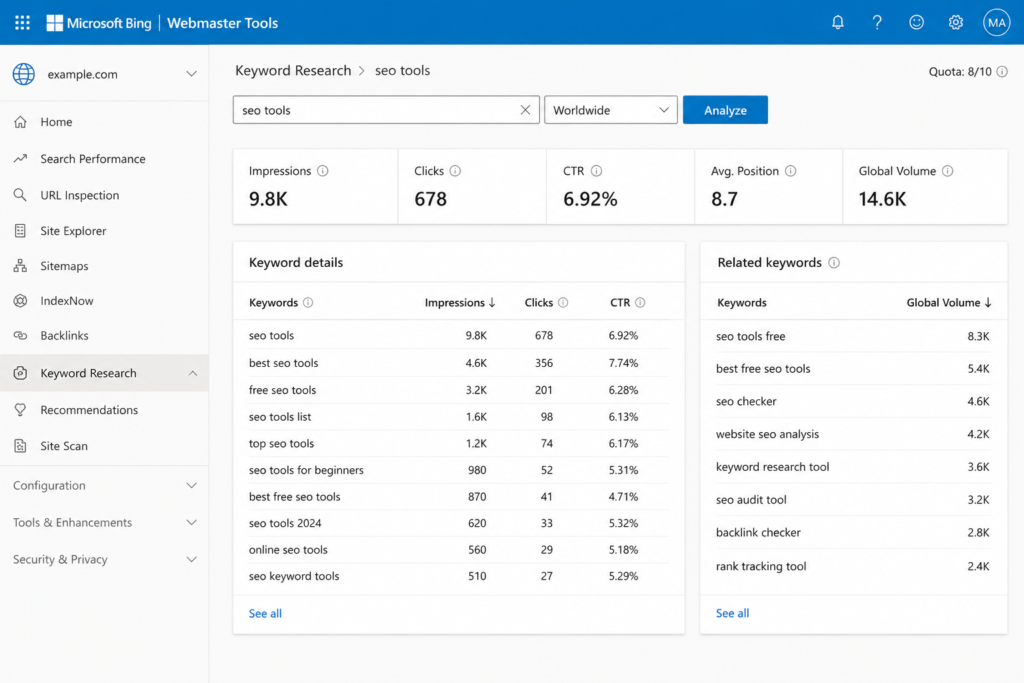
Bing Webmaster Tools includes features for:
- Search performance
- URL inspection
- Keyword research
- Backlink information
- Sitemap management
- Site scanning
- SEO issue detection
The built-in keyword research tool is particularly useful for a beginner because it can surface related queries and questions without requiring another subscription.
Its Site Scan feature can also crawl your site looking for common technical SEO issues. The available scan quota is calculated for your site, so do not rely on old articles quoting one universal crawl limit.
Pros
- Free
- Easy to connect after Search Console
- Keyword research is included
- Technical site scanning is included
- Provides another source of real search data
Cons
- Bing has a smaller search market than Google
- Its keyword data should not automatically be treated as Google demand
- It does not replace a full competitor research platform
Best for: getting extra keyword and technical SEO information without immediately paying for another tool.
Also worth installing: Google Analytics
Google Analytics 4 is free and useful, but I would classify it as an analytics tool rather than a pure SEO tool.
Search Console answers:
How did people find me through Google Search?
Analytics is better at answering:
What did visitors do after arriving on my site?
Eventually you will probably want both.
Step 2: Find Keywords Worth Writing About
3. Google Keyword Planner
Google Keyword Planner lives inside Google Ads, but bloggers often use it as a source of keyword ideas and estimated search demand.
Its biggest advantage is obvious: the data comes from Google.
You can enter a topic, phrase, or website and use Keyword Planner to discover related keyword ideas and estimates of monthly searches.
But beginners need to understand two important limitations.
The first limitation: account setup
Google currently requires you to complete Google Ads account setup, including entering billing information, to access basic Keyword Planner functionality.
That does not mean you have to start spending money on ads.
But it does mean Keyword Planner no longer fits the strict definition of a zero-friction tool where you simply create a free account and start researching.
If you do not want to enter billing information at all, skip it.
You have alternatives later in this list.
The second limitation: search volume precision
Keyword Planner may display search demand in broad ranges rather than giving every user an exact number.
That makes it better for questions like:
Does this topic appear to have meaningful demand?
than:
Exactly how many visitors will I get if I rank number three?
No keyword tool can reliably answer the second question anyway.
Pros
- Keyword data from Google
- Useful for validating whether topics have demand
- Generates related keyword ideas
- No requirement to run an active paid campaign just to research ideas
Cons
- Google Ads account setup is required
- Billing information may be required during setup
- Search volume can be shown in broad ranges
- Built primarily for advertisers, not bloggers
Best for: checking whether a topic has meaningful search demand.
4. Keyword Surfer
Keyword Surfer is useful because it removes one of the biggest problems with SEO tools:
You forget to open them.
It is a Chrome extension that displays keyword-related information while you are already searching Google.
Instead of opening another dashboard, you can search normally and see keyword ideas and estimated search volume alongside the results.
That makes it particularly convenient when you are brainstorming blog topics.
Search something like:
best microphone for beginner podcasters
and Keyword Surfer can help you identify related phrases without interrupting your research workflow.
Just remember that its search volume data is an estimate.
It is useful for comparison and idea generation, not as an exact measurement of Google’s search traffic.
Pros
- Very low setup friction
- Works directly in Google Search
- Helpful for discovering related terms
- Useful during manual SERP research
- Core keyword research functionality is free
Cons
- Search volume is estimated
- It is not a complete SEO suite
- Some Surfer features have separate usage limits or paid-plan requirements
Best for: bloggers who want quick keyword ideas without constantly switching between SEO dashboards.
5. Ubersuggest
Ubersuggest is a freemium SEO platform created by Neil Patel.
It combines several tools beginners usually search for separately:
- Keyword ideas
- Search volume estimates
- SEO difficulty metrics
- Content ideas
- Site auditing
- Backlink information
- Basic competitor research
The interface is easier to understand than some enterprise SEO platforms, which makes Ubersuggest useful when you are still learning the vocabulary of SEO.
The problem is the free usage limit.
The web application is heavily restricted for free users, so I would not build my entire SEO workflow around it.
Instead, use it for occasional checks when another data point would help you make a decision.
The Chrome extension is more generous for everyday search-result research and currently lists a larger daily search allowance than the main free web experience.
Because Ubersuggest has changed its limits before, always check the current account limits rather than assuming an old number from another article is still correct.
Pros
- Beginner-friendly interface
- Combines several SEO functions
- Free account available
- Useful for occasional competitor and keyword checks
- Chrome extension available
Cons
- Free web usage is limited
- Many useful features encourage upgrading
- Third-party metrics are estimates
Best for: occasional SEO research when you want more context than Search Console provides.
Also Useful: Google Trends
Google Trends does not tell you monthly search volume.
That is exactly why many beginners misunderstand it.
Instead, Trends shows relative search interest over time.
That makes it excellent for identifying:
- Seasonal topics
- Rising subjects
- Declining topics
- Regional differences
- Comparisons between similar search terms
Suppose you are deciding whether to write about two tools.
Keyword volume tells you which appears larger.
Google Trends can tell you whether one is growing while the other is slowly disappearing.
Those are different questions, and both can matter.
Also Useful: AnswerThePublic
AnswerThePublic turns a seed keyword into questions and related searches.
For bloggers, its biggest value is not necessarily finding your primary keyword.
It is finding the questions that belong inside the article.
For example, if your main topic is:
free SEO tools
you might discover question patterns around:
- Which SEO tools are really free?
- Can beginners do SEO without paying?
- What SEO tool should I use first?
- Is Google Search Console enough?
- When should I pay for an SEO tool?
Those questions can become H2s, FAQ entries, or future articles.
Free usage is limited and can change, so check the current allowance when you create an account.
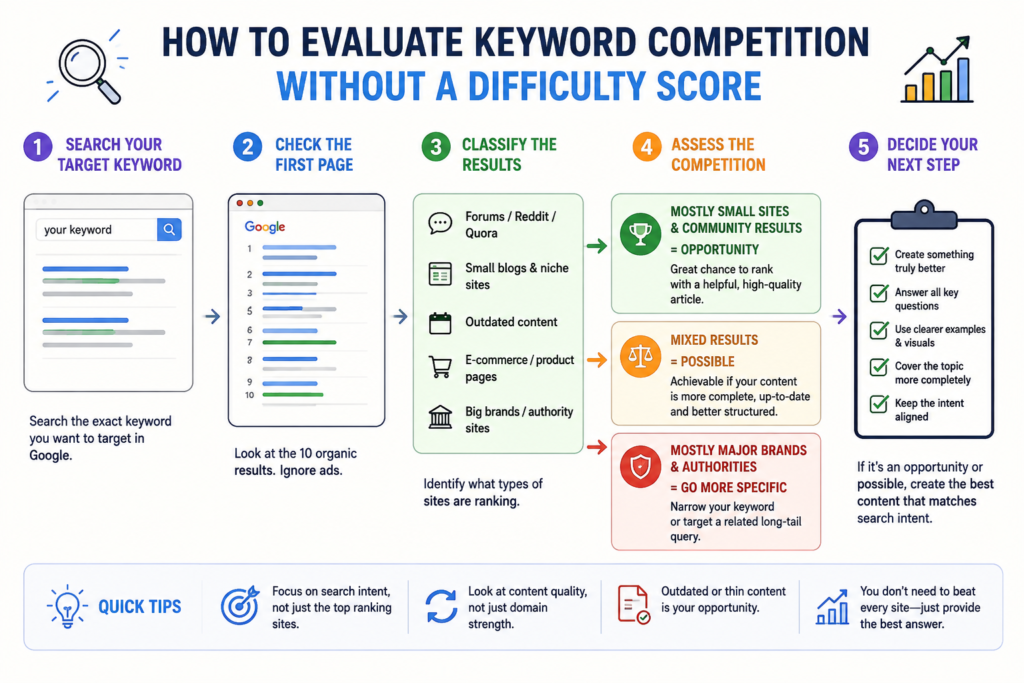
How to Judge a Keyword Without a Difficulty Score
One problem with relying only on free SEO tools is that you may not always get a convenient Keyword Difficulty number.
That is not necessarily a disaster.
You can learn a lot by manually reading the first page of Google.
Search your target query and look at who currently ranks.
If the results are dominated by huge established websites with extremely strong pages, a brand-new blog may struggle.
If the results include:
- Reddit discussions
- Forums
- Q&A pages
- Small niche blogs
- Outdated posts
- Thin articles that barely answer the question
you may have found an opportunity.
A simple beginner heuristic is:
Mostly smaller sites and community results: worth investigating.
A mixture of big and small sites: potentially achievable if you can create something meaningfully better.
Every result is an authoritative brand with an excellent page: consider narrowing the query.
Do not treat this as a mathematical formula.
It is a judgement call.
But learning to read a search results page is one of the most useful SEO skills you can develop, and it costs nothing.
Step 3: Optimise the Article
6. Rank Math or Yoast SEO
If your blog runs on WordPress, you will probably want an SEO plugin.
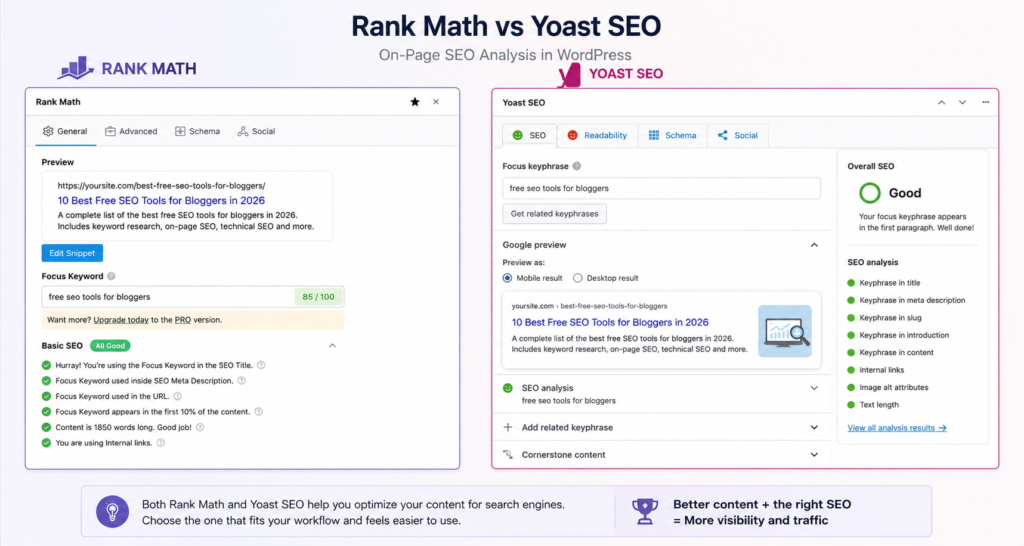
The two obvious choices are Rank Math and Yoast SEO.
Both can handle the basic tasks a new WordPress blogger needs, including:
- SEO titles
- Meta descriptions
- XML sitemaps
- Structured data
- Social previews
- On-page optimisation guidance
You do not need both.
Choose one.
Rank Math Free
Rank Math’s free version is generous.
It includes focus-keyword analysis, schema features, sitemap controls, redirects, and a large number of SEO settings that would require separate plugins on some WordPress setups.
The free version supports multiple focus keywords per article, while some advanced functionality remains reserved for paid users.
Its flexibility is one of its strengths, but it can also be slightly overwhelming if you enable everything.
Yoast SEO Free
Yoast has been around for much longer and has an enormous ecosystem of guides, tutorials, and troubleshooting discussions.
The free plugin handles the SEO basics well and includes content and readability analysis.
It generally takes a more guided approach than Rank Math.
Which one should a beginner choose?
If you want more functionality without paying, I would start with Rank Math. You can start with the free version and only consider the paid features later if you actually need them.
If you want a mature plugin with an enormous documentation ecosystem and a simpler established workflow, Yoast is still a perfectly reasonable choice.
The bigger point is this:
Do not spend three days comparing SEO plugins.
Your choice between Rank Math and Yoast is unlikely to determine whether your blog succeeds.
Publishing useful content matters considerably more.
Pros
- Both have useful free versions
- Handle essential WordPress SEO settings
- Make titles, descriptions, schema, and sitemaps easier
- Helpful for beginners learning on-page SEO
Cons
- WordPress only
- SEO scores can encourage unnecessary optimisation
- A green score does not mean an article deserves to rank
Best for: WordPress bloggers who want a practical on-page SEO system.
7. A Free AI Assistant
AI assistants can be extremely useful for SEO.
They can also completely ruin your research if you use them for the wrong job.
The distinction is simple:
Use AI for thinking and structure. Do not treat it as an SEO metrics database.
AI tools are excellent for tasks such as:
- Grouping keywords by search intent
- Turning keyword research into a content plan
- Building an article outline
- Identifying missing subtopics
- Generating title variations
- Improving explanations
- Finding possible FAQ questions
- Comparing different content angles
If you are still deciding which tools to use, see my guide to the best free AI writing tools for beginners.
Two of the most useful general-purpose options are ChatGPT and Claude. If you are unsure which is more suitable for your workflow, I have also compared ChatGPT vs Claude for beginners.
And if blogging is only one part of your workflow, this guide to the best AI tools for content creators in 2026 covers a broader range of tools.
What you should not ask AI to invent
Be careful with prompts such as:
“Give me the monthly search volume and keyword difficulty for these 50 keywords.”
Unless the AI assistant is connected to a live SEO data source and clearly identifies where the metric came from, do not treat the resulting numbers as real keyword data.
A number can look extremely convincing and still be an estimate, an outdated figure, or simply generated.
Use an SEO tool for SEO metrics.
Use AI to help you interpret, organise, and act on the information.
Two AI prompts worth saving
“Here is a list of keywords I collected. Group them by search intent and turn them into potential blog post topics. Flag keywords that should be covered as sections inside a larger article rather than separate posts. Do not invent search volume or keyword difficulty.”
And:
“My target query is [QUERY]. Here are the headings used by several top-ranking pages: [PASTE HEADINGS]. Identify important questions, examples, comparisons, or subtopics a reader might still want answered.”
These are much safer uses of AI than asking it to invent SEO statistics.
Pros
- Excellent for organising research
- Useful for creating outlines
- Helps uncover missing questions
- Saves time during content planning
- Several major assistants have free access options
Cons
- Can generate confident but unsupported factual claims
- Should not replace keyword databases
- Usage limits change frequently
- AI output still requires editing and fact-checking
Best for: turning raw research into a useful article structure.
8. Manual SERP Analysis
This is not really a tool.
It is still one of the most important items on the list.
Before you write a post, search your primary query and actually look at what ranks.
Ask:
- What type of page is Google rewarding?
- Are the results tutorials, product pages, comparisons, or list posts?
- How detailed are they?
- Are they current?
- What questions do they answer?
- What do they fail to explain?
- Are smaller independent websites ranking?
- Is the search intent obvious?
Suppose you want to rank for:
best free SEO tools for bloggers
If almost every result is a list, writing a 700-word opinion piece probably does not match the search intent.
If every result is a beginner guide, an advanced technical SEO reference may solve the wrong problem.
SEO tools can give you metrics.
The SERP shows you the actual result Google is currently trying to satisfy.
Pros
- Completely free
- No usage limits
- Shows the real competitive landscape
- Helps you understand search intent
- Often reveals weaknesses in existing results
Cons
- Subjective
- Takes time
- Does not provide historical search volume
- Easy to overanalyse
Best for: every article you seriously want to rank.
What About Grammarly, QuillBot, and Hemingway?
These are writing tools rather than SEO tools.
They can help make an article clearer, easier to read, and more polished, but installing them will not automatically improve your rankings.
A tool cannot turn a weak article into a useful one simply by fixing commas.
If you are considering an editing assistant, I have a separate comparison of Grammarly vs QuillBot for beginners that explains where each one is useful.
Use writing tools to improve the reader’s experience.
Do not confuse a writing score with an SEO ranking factor.
Step 4: Run a Monthly Technical SEO Check
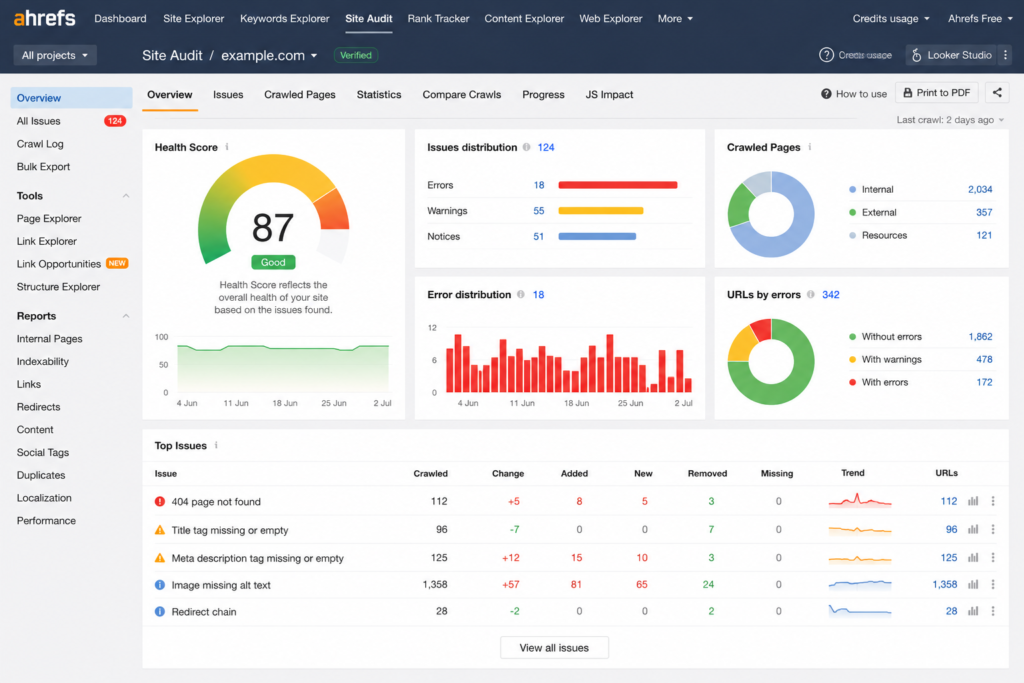
9. Ahrefs Free
You may still see the name Ahrefs Webmaster Tools in older guides.
Ahrefs now refers to this offering as Ahrefs Free.
For a small blog, it is one of the most useful free technical SEO options because it combines several capabilities for websites you can verify that you own.
The free account includes access to tools such as:
- Site Audit
- Site Explorer for verified websites
- Web Analytics
For verified projects, Ahrefs currently provides 5,000 Site Audit crawl credits per project per month.
You can also inspect up to 1,000 backlinks and keywords at once in the relevant Site Explorer views for your verified website.
That is more than enough for many new blogs.
Why Site Audit is useful
Site Audit crawls your website and looks for technical and on-page issues.
Examples include:
- Broken internal links
- Redirect problems
- Indexability issues
- Missing tags
- Duplicate elements
- Canonical problems
- Internal linking issues
- Crawlability problems
The important phrase here is:
your website.
The free account is primarily valuable for properties you can verify.
If your goal is deep competitor research, that is where paid SEO plans become more useful.
Pros
- Powerful free site auditing
- Backlink visibility for your own site
- Useful technical SEO data
- Unlimited verified websites
- Generous enough for small blogs
Cons
- Competitive research is much more restricted than on paid plans
- Reporting and export capabilities are limited
- Many advanced Ahrefs tools require payment
Best for: running a serious technical SEO check on your own blog without buying an expensive SEO suite.
10. PageSpeed Insights
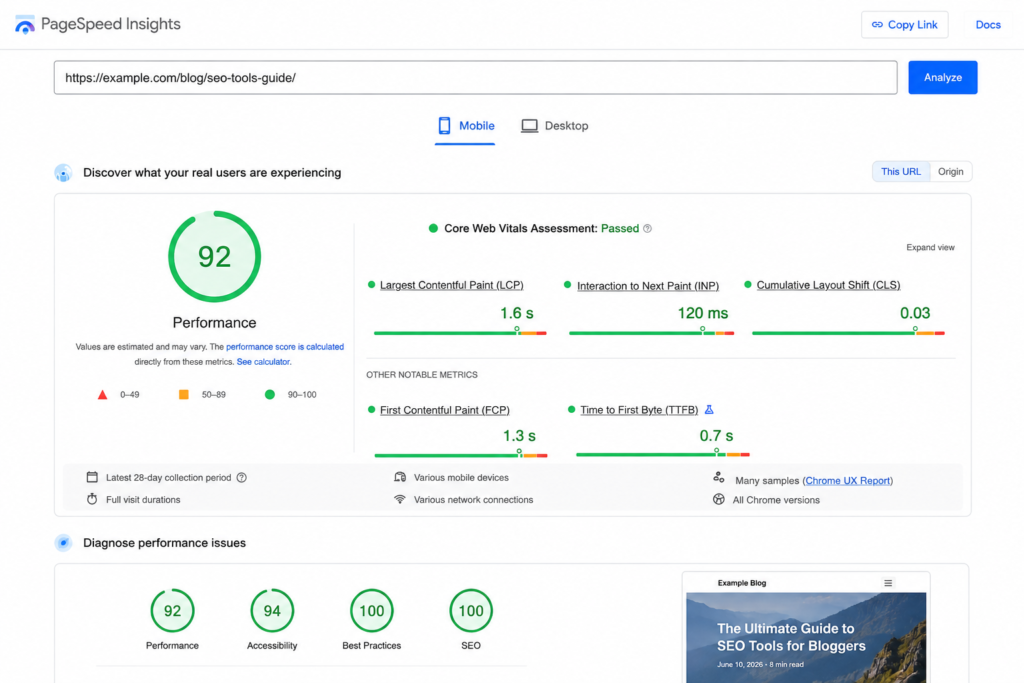
PageSpeed Insights is Google’s free page-performance testing tool.
Enter a URL and it analyses performance and Core Web Vitals information.
For a beginner blog, it is particularly useful for finding obvious performance problems such as:
- Oversized images
- Slow-loading resources
- Layout shifts
- Heavy JavaScript
- Rendering delays
- Poor mobile performance
But there is a trap.
Beginners often discover PageSpeed Insights and immediately decide that their website must score 100.
Then they spend an entire weekend adjusting scripts instead of publishing another useful article.
Do not do that.
A performance problem that makes your site miserable to use deserves attention.
A slightly imperfect laboratory score does not automatically explain why your six-post blog receives no search traffic.
Pros
- Free
- No account required
- Uses Google’s performance framework
- Highlights actionable technical issues
- Useful for checking mobile performance
Cons
- Scores can fluctuate
- Reports can be intimidating
- Beginners may spend too much time chasing tiny improvements
- Speed is only one part of a much larger SEO picture
Best for: a quick monthly performance check.
Which SEO Audit Warnings Can a New Blog Ignore?
SEO audit tools are designed to find problems.
That means they can make a ten-post website look as though it is falling apart.
Not every warning deserves the same amount of attention.
For a very small blog, I would generally prioritise issues that affect whether visitors or search engines can actually access your content.
Fix these quickly
- Important pages accidentally set to
noindex - Pages blocked from crawling by mistake
- Broken internal links
- Important pages returning server errors
- Incorrect canonical tags
- Missing or broken XML sitemaps
- Redirect loops
- Major mobile usability problems
- Very slow pages caused by obvious oversized assets
Usually lower priority
- Minor warnings on archive pages
- Word-count warnings
- Missing descriptions on low-value tag pages
- Tiny PageSpeed opportunities
- Cosmetic schema recommendations
- Minor theme-generated HTML warnings
Use judgement.
The goal is not to make every SEO tool display a perfect green dashboard.
The goal is to build a website that search engines can crawl and readers actually want to use.
Free SEO Tools Comparison
| Tool | Main Use | Free Limitation | Account Needed? | Best For |
|---|---|---|---|---|
| Google Search Console | Search performance and indexing | Free product | Yes, site verification | Every blogger |
| Bing Webmaster Tools | Search data, keyword research, site scans | Site-specific limits apply | Yes | Extra free SEO data |
| Google Keyword Planner | Keyword ideas and demand estimates | Google Ads setup required | Yes | Demand validation |
| Keyword Surfer | Keyword ideas inside Google | Estimated data | Extension | Fast keyword research |
| Ubersuggest | Keywords and basic SEO research | Limited free usage | Yes | Occasional checks |
| Rank Math / Yoast | WordPress on-page SEO | Advanced features are paid | Yes | WordPress bloggers |
| AI Assistant | Clustering, outlines, research organisation | Usage caps vary | Usually | Content planning |
| Manual SERP Analysis | Intent and competition analysis | Your time | No | Validating every topic |
| Ahrefs Free | Technical audit and own-site data | Verified sites and reporting limits | Yes | Monthly SEO audit |
| PageSpeed Insights | Performance and Core Web Vitals | Free | No | Speed checks |
Best Free Keyword Research Tools Compared
| Tool | Data Type | Setup Difficulty | Main Weakness | Best Use |
|---|---|---|---|---|
| Google Keyword Planner | Google keyword estimates | Medium to high | Google Ads setup and broad ranges | Validating demand |
| Keyword Surfer | Third-party estimates | Very low | Estimated volume | Fast research |
| Ubersuggest | Third-party SEO data | Low | Limited free usage | Occasional deeper checks |
| Bing Webmaster Tools | Bing search data | Low after verification | Smaller search ecosystem | Related queries and questions |
| Google Trends | Relative Google interest | Very low | No absolute volume | Seasonality and trend direction |
| AnswerThePublic | Question and topic ideas | Low | Limited free usage | Finding questions and subtopics |
When Are Free SEO Tools No Longer Enough?
Probably later than you think.
A beginner often assumes paying $100 or more per month for an SEO platform will unlock traffic.
Usually it unlocks more data.
Those are not the same thing.
More data only becomes valuable when you have enough content and enough SEO activity to use it.
I would start considering paid SEO software when several of these become true:
- You have dozens of published articles.
- Search Console shows consistent impressions and clicks.
- Keyword research is becoming a regular part of your workflow.
- You need serious competitor research.
- You need historical ranking data.
- You manage multiple content projects.
- Free limits regularly interrupt your work.
- You need exports or reporting for clients.
- You want dedicated rank tracking.
Before that point, Search Console, Bing Webmaster Tools, Ahrefs Free, and a few lightweight research tools can take you surprisingly far.
What are you really paying for?
Paid SEO plans typically unlock more of the following:
| Capability | Free Workflow | Paid SEO Platform |
|---|---|---|
| Your own search data | Excellent | Excellent |
| Own-site technical auditing | Good | More capacity |
| Competitor research | Limited | Strong |
| Historical data | Limited | Much better |
| Keyword difficulty | Limited or unavailable | Standard |
| Keyword databases | Limited | Much larger |
| Rank tracking | Basic or limited | Dedicated |
| Data exports | Limited | Better |
| Reporting | Basic | Advanced |
Ahrefs Starter is one possible step between a completely free account and Ahrefs’ larger professional plans.
Semrush is another option worth comparing once competitor research, rank tracking, and larger keyword databases become important.
But check current pricing and plan limits before subscribing. SEO software changes frequently.
A One-Hour Weekly SEO Routine for Beginners
Having ten tools does not help if you never know which one to open.
A simple routine is more useful.
Monday — 15 minutes
Open Google Search Console.
Look at the last few weeks.
Find:
- Pages gaining impressions
- Queries connected to existing posts
- Pages with impressions but weak click-through rates
- Articles beginning to appear for useful searches
Choose one page that deserves attention.
Do not rewrite your entire website.
Wednesday — 20 minutes
Research the next article.
Start with a topic idea.
Then:
- Check related keywords.
- Look at Google Trends if seasonality matters.
- Search the main query manually.
- Study the first-page results.
- Decide whether you can create something genuinely more useful.
Only then start outlining.
Friday — 15 minutes
Review the newest article.
Check:
- Title
- Search intent
- Meta description
- H2 and H3 structure
- Internal links
- External references where needed
- Image alt text
- URL
- Readability
- Whether the article actually answers the query
An SEO plugin can remind you of these things.
Do not let its score dictate your writing.
Once a Month — 10 minutes
Run:
- Ahrefs Site Audit
- Bing Site Scan
- PageSpeed Insights on a few important pages
Fix serious problems.
Ignore low-impact noise until you have a reason to care.
What New Bloggers Should Stop Doing
SEO becomes much easier when you stop spending time on activities that feel productive but rarely move the site forward.
Stop:
- Checking rankings every morning
- Rewriting articles published three days ago
- Changing titles constantly
- Chasing a PageSpeed score of 100
- Installing multiple SEO plugins
- Comparing ten keyword tools for the same phrase
- Treating keyword difficulty as an objective truth
- Publishing AI-generated articles without editing or fact-checking
- Writing for an SEO plugin instead of a human reader
- Buying expensive software before you have enough content to use it
Your first job is not building the world’s most sophisticated SEO stack.
It is publishing useful pages that deserve to be discovered.
My Recommendations
Best SEO Tool for Absolute Beginners: Google Search Console
Start here.
Search Console gives you something no generic keyword tool can reproduce: direct information about how your own site appears in Google Search.
Install it before worrying about professional SEO software.
Best Free SEO Combination for WordPress Bloggers: Search Console + Bing Webmaster Tools + Rank Math
This gives a beginner a surprisingly complete workflow.
Search Console provides Google search data.
Bing Webmaster Tools adds another search dataset, keyword research, and technical scanning.
Rank Math handles the WordPress on-page side.
You can operate a small blog for a long time with those three tools.
Best Free Technical SEO Tool: Ahrefs Free
For a verified website, Ahrefs Free gives you a real crawler and useful SEO data without forcing you immediately into one of the expensive professional plans.
Run it periodically rather than obsessively.
Best Free Keyword Research Workflow
I would not rely on one tool.
Use:
Keyword Surfer or Bing Webmaster Tools → Google Trends → manual Google SERP analysis.
If you are comfortable completing Google Ads account setup, add Keyword Planner as another source of demand estimates.
The purpose of keyword research is not collecting numbers.
It is deciding what deserves to be written.
Best AI Addition to the Workflow
Use ChatGPT, Claude, Gemini, or another capable assistant after you have collected real information.
Let AI organise the research.
Do not let it invent the research.
For more options, start with these guides:
- Best Free AI Writing Tools for Beginners
- ChatGPT vs Claude for Beginners
- Best AI Tools for Content Creators in 2026
- Grammarly vs QuillBot for Beginners
FAQ
What is the best free SEO tool for beginners?
Google Search Console.
It gives you direct information about your site’s visibility in Google, including impressions, clicks, queries, pages, indexing information, and search performance.
If you are starting a new blog, install Search Console before paying for an SEO platform.
Are free SEO tools enough for a new blog?
Yes, in most cases.
A new blogger can cover the essentials using Google Search Console, Bing Webmaster Tools, a WordPress SEO plugin if relevant, manual SERP research, and a free technical audit tool.
Paid tools become much more useful once you publish enough content to need competitor research, historical data, rank tracking, larger keyword databases, or higher reporting limits.
Are free keyword search-volume numbers accurate?
Treat them as estimates rather than guarantees.
Different tools use different data sources and modelling methods, so two platforms may report different search volumes for the same keyword.
Use search volume to compare opportunities, not to predict your future traffic precisely.
Do I need Google Keyword Planner for SEO?
No.
It can be useful because it provides Google’s own keyword estimates, but it is not essential.
Bing Webmaster Tools, Keyword Surfer, Google Trends, Search Console, and manual SERP research can still give a beginner plenty of information.
Does Google Keyword Planner require a credit card?
Google currently requires billing information as part of completing Google Ads account setup to access basic Keyword Planner features.
That does not mean you have to run or fund an advertising campaign, but bloggers who do not want to enter billing information may prefer another keyword research option.
Is Rank Math better than Yoast?
Both can handle the essential SEO requirements of a WordPress blog.
Rank Math generally provides a generous collection of features in its free plugin.
Yoast has a long history, a large documentation ecosystem, and a familiar workflow.
For a new blogger, either is capable enough.
Choose one and spend the saved time creating better content.
Can ChatGPT replace SEO tools?
Not completely.
AI assistants are excellent for:
- Content outlines
- Keyword clustering
- Search-intent analysis
- Brainstorming
- Explaining SEO concepts
- Finding content gaps from information you provide
But they should not be treated as your source of proprietary SEO metrics unless they are connected to a real data provider and clearly identify that source.
Use AI for reasoning.
Use SEO tools for SEO data.
How long does it take to see data in Google Search Console?
A new site’s Performance report may look almost empty at first.
Google first has to discover your pages, crawl them, index eligible pages, and begin showing them for searches.
Those processes do not all happen at the same time.
Seeing very little Performance data shortly after launching a blog is normal.
Focus first on making sure important pages can be indexed, then keep publishing useful content.
Should beginners track rankings every day?
Usually not.
Daily ranking checks create noise because search positions fluctuate.
For a small blog, trends in impressions, clicks, and the queries appearing in Search Console are usually more useful.
Review performance periodically and make changes when the data shows a meaningful pattern.
Do Grammarly or QuillBot improve SEO rankings?
Not directly.
They can help you improve grammar, clarity, flow, and readability, which may make the content more useful to readers.
But neither tool is a substitute for:
- Search intent
- Useful information
- Original experience
- Internal linking
- Technical SEO
- Good site structure
If you are deciding between them, read the full Grammarly vs QuillBot comparison for beginners.
Start With One Tool
The fastest way to waste your first weekend learning SEO is to register for every tool in this article.
Do not do that.
Start with Google Search Console.
Verify your website.
Submit your sitemap.
Publish useful articles.
Then watch which pages and queries begin receiving impressions.
Once you have some data, use it to decide what to improve.
If you are using WordPress, install one SEO plugin.
When you need new topics, add a lightweight keyword research workflow.
Once a month, run a technical audit.
That is enough.
You do not need ten dashboards open every morning.
You need a repeatable system:
Research something people genuinely want → create the best answer you can → make sure search engines can access it → measure what happens → improve what shows potential.
The tools are there to support that process.
They are not the process.
Enjoyed this guide? Support ByteTony and help us create more simple, beginner-friendly tech guides.
☕ Support ByteTony