Starting to write with AI can feel overwhelming. There are dozens of tools, confusing pricing pages, and free plans with different limits, features, and signup requirements.
The good news is that you do not need an expensive subscription to get started.
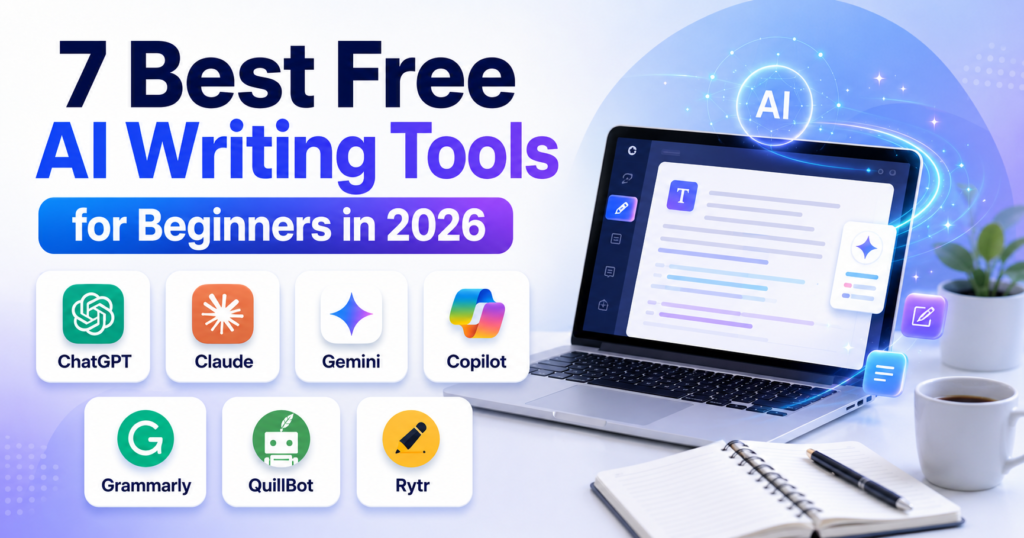
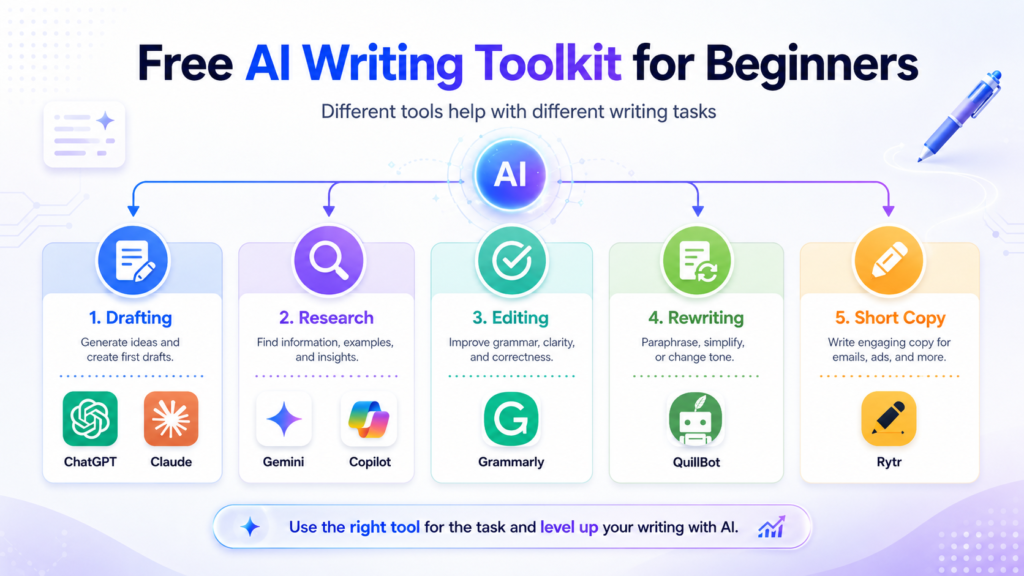
In this guide, we compare seven of the best free AI writing tools for beginners in 2026. These tools can help you brainstorm ideas, create outlines, draft content, improve grammar, rewrite awkward sentences, and produce short marketing copy.
You do not need to use all seven. By the end of this guide, you will know which tool fits your needs and how to combine a few free options into a simple writing workflow.
Affiliate disclosure: This article may contain affiliate links. If you make a purchase through one of these links, ByteTony may earn a small commission at no additional cost to you. This does not affect which tools we recommend.
Last checked: July 27, 2026. AI tools frequently change their free-plan features, usage limits, and prices. Always confirm the latest details on the official website before choosing a tool or upgrading to a paid plan.
Table of Contents
What Makes a Good Free AI Writing Tool for Beginners?
A useful beginner-friendly AI writing tool should make writing easier without creating more confusion.
We focused on the following factors:
- A genuinely useful free plan: The free version should let you complete real writing tasks, not just preview the interface.
- Beginner-friendly design: You should be able to start writing without learning complicated commands.
- A clear purpose: Some tools handle many tasks, while others specialize in editing, rewriting, or short marketing copy.
- Reasonable free limits: The free plan should provide enough access to test the tool properly.
- Practical writing features: Drafting, brainstorming, proofreading, summarizing, and rewriting are especially useful for beginners.
We reviewed the official pricing and support pages for each tool and focused on the features most relevant to first-time users.
No tool received a higher position because of an affiliate relationship.
The 7 Best Free AI Writing Tools for Beginners
The first four tools are general-purpose AI assistants. You usually need only one of them as your main writing assistant.
The final three are specialist tools that can help you edit, rewrite, or create short-form content.
1. ChatGPT Free — Best Overall for Complete Beginners
ChatGPT is one of the most versatile AI assistants available. It can help you generate ideas, create outlines, draft articles, rewrite paragraphs, summarize information, and improve existing content.
Its conversational interface is especially useful for beginners because you can describe what you need in normal language.
For example, you can ask:
Write a 150-word introduction for a beginner-friendly article about growing herbs at home. Use a friendly and practical tone.
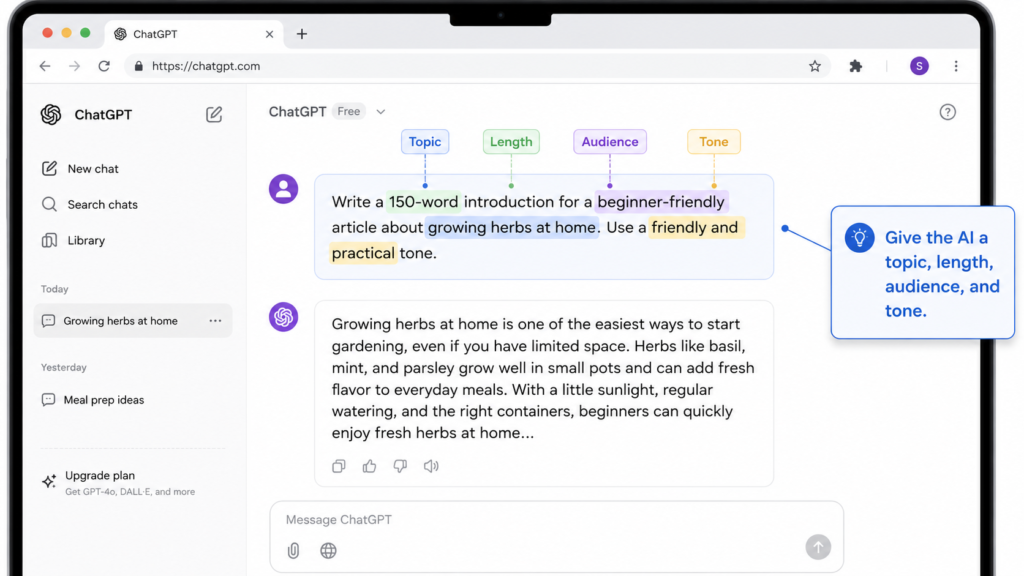
You can then continue the conversation by asking ChatGPT to shorten the introduction, make it more professional, add examples, or simplify the language.
Best for: Beginners who want one flexible tool for writing, editing, brainstorming, and general questions.
Why beginners may like it
ChatGPT does not require you to understand complicated writing software. You can explain what you want, review the answer, and request changes until the result fits your needs.
Free users may also have limited access to features such as:
- Web search
- File and image uploads
- Data analysis
- Image creation
- Existing custom GPTs
The availability and limits of these tools may differ from the main chat limit.
The catch
ChatGPT does not publish one permanent message limit for every free user. Limits can change depending on the model, feature, system capacity, and other factors.
When you reach your current limit, ChatGPT normally displays when access will reset or which upgrade options are available.
Ads may also appear for free users in certain countries. These ads are displayed separately and do not influence ChatGPT’s answers.
Creating your own custom GPT currently requires a paid plan, although free users may be able to discover and use existing GPTs.
Pros
- Handles many different writing tasks
- Easy conversational interface
- Useful for brainstorming, drafting, and editing
- Includes several advanced tools with limited free access
- Suitable for both short and long content
Cons
- Free usage limits can interrupt longer sessions
- Separate tools may have their own limits
- Ads may appear in certain countries
- Creating custom GPTs requires a paid plan
Free plan? Yes. ChatGPT offers a free plan, but limits and available features may change.
2. Claude Free — Best for Natural Long-Form Writing
Claude is an AI assistant developed by Anthropic. It is particularly useful for drafting, editing, and improving longer pieces of content.
Many users choose Claude when they want smooth, readable writing with fewer stiff or repetitive sentences. It can be useful for blog posts, essays, reports, email drafts, and content editing.
Best for: Blog posts, essays, long-form drafts, and natural-sounding writing.
Why beginners may like it
Claude can help you:
- Create article outlines
- Draft long sections
- Improve paragraph flow
- Rewrite content in a different tone
- Analyze text and images
- Search the web
- Create and edit Artifacts
Artifacts display substantial content, such as documents, code, diagrams, or other creations, in a separate workspace beside the conversation.
However, Claude Projects and their reusable knowledge bases are currently reserved for paid plans.
The catch
Claude’s free usage is limited, but Anthropic does not provide one fixed message allowance that applies to every conversation.
Your available usage may be affected by:
- The length of your messages
- The size of uploaded files
- The length of the conversation
- The model being used
- Web search and other tools
- Artifact creation
- Current service demand
Long conversations and large files can use your allowance more quickly than short, simple prompts.
Pros
- Strong option for long-form writing
- Produces clear and natural-sounding drafts
- Can analyze text and images
- Web search is available on the free plan
- Artifacts are available to free users
Cons
- Free usage can feel limited during long sessions
- Usage depends on message and file size
- Limits may vary based on demand
- Projects require a paid plan
Free plan? Yes. Claude offers a free plan for occasional use, with variable usage limits.
3. Google Gemini Free — Best for Research and Google Users
Google Gemini is a useful choice for people who already use services such as Gmail, Google Docs, Google Drive, and Google Calendar.
It can assist with research, brainstorming, summarizing, drafting, and general questions. It also has access to public information from Google Search, making it helpful for writing tasks that require current information.
Best for: Research-based writing and users who already work with Google services.
Why beginners may like it
Gemini can connect with supported apps and services after you give it permission.
Depending on your account, device, location, and settings, it may help you:
- Summarize emails from Gmail
- Find information inside supported Google Drive files
- Summarize documents
- Create or find Google Calendar events
- Work with notes and tasks
- Research information using Google Search
- Draft and improve written content
Gemini can find and summarize supported files in Google Drive, but it cannot manage your Drive structure by creating folders or moving files between folders.
Keeping your folders and documents organized can make it easier to find the right material. You can follow this beginner guide on how to organize files in Google Drive before using Gemini with your stored documents.
The catch
Google no longer describes the free Gemini plan with one simple daily prompt number.
Gemini uses compute-based limits that consider factors such as:
- Prompt complexity
- The model you select
- The features you use
- Uploaded files
- Conversation length
- Current service capacity
Limits generally refresh every five hours until you reach a weekly limit. Higher-compute features may use more of your allowance, and availability can change during periods of high demand.
Connected Apps also depend on your account type, country, language, device, settings, and Google Workspace edition.
Pros
- Useful for research and current information
- Connects with supported Google services
- Can summarize supported Gmail and Drive content
- Includes tools such as Canvas and Gems
- Convenient for existing Google users
Cons
- Usage limits are not expressed as one simple prompt number
- Availability varies by account and region
- Some integrations require specific settings or plans
- Cannot directly organize folders or move files in Google Drive
Free plan? Yes. Gemini provides standard free access without a Google AI subscription, but limits and feature availability can change.
4. Microsoft Copilot Free — Best for Microsoft and Edge Users
Microsoft Copilot is a free general-purpose AI assistant available through the web, desktop and mobile apps, and Microsoft Edge.
It can help with writing, brainstorming, summarizing, answering questions, researching information from the web, and generating images.
Best for: Everyday writing tasks and people who regularly use Microsoft products or the Edge browser.
Why beginners may like it
Microsoft Copilot can help you:
- Draft emails and short articles
- Brainstorm ideas
- Rewrite existing text
- Summarize web pages
- Research current information
- Create images
- Ask general questions
You can use the free web version without signing in for some basic tasks. Signing in with a personal Microsoft account may provide access to features such as chat history, image creation, longer conversations, and voice interactions.
The catch
The free standalone Copilot and Copilot inside Microsoft 365 applications are not the same product experience.
Access to Copilot directly inside Word, Excel, PowerPoint, Outlook, and other Microsoft 365 applications depends on factors such as:
- Your Microsoft account type
- Your Microsoft 365 subscription
- Your organization’s license
- Administrator settings
- Regional availability
A free standalone Copilot account does not automatically give every user full AI integration inside the desktop versions of Microsoft Office applications.
Pros
- Free standalone web and app experience
- Useful for writing and web-based research
- Can summarize web pages in Microsoft Edge
- Supports image creation
- Easy to access with a Microsoft account
Cons
- Microsoft’s different Copilot versions can be confusing
- Full integration inside Microsoft 365 apps may require an eligible subscription
- Features can vary by account type and region
- Less specialized for long-form writing than Claude
Free plan? Yes. Microsoft Copilot is available as a free standalone assistant, while deeper Microsoft 365 integration depends on your plan and account.
5. Grammarly Free — Best for Grammar and Proofreading
Drafting is only the first step. You also need to check your grammar, spelling, clarity, and tone before publishing or sending your work.
Grammarly is one of the best-known writing assistants for proofreading. It works through its web editor, browser extensions, and supported desktop applications.
Best for: Correcting grammar and spelling and polishing existing content.
Why beginners may like it
Grammarly works quietly while you type and points out common writing problems.
The free plan can help you:
- Correct spelling mistakes
- Fix basic grammar problems
- Identify some punctuation errors
- View basic tone information
- Generate text using a limited number of AI prompts
This makes Grammarly a useful second tool after ChatGPT, Claude, Gemini, or Copilot.
You can create your first draft with an AI assistant and then use Grammarly to catch basic mistakes before publishing it.
The catch
The free plan currently includes 100 generative AI prompts per month.
More advanced features require Grammarly Pro, including:
- Full-sentence rewrites
- Advanced tone adjustments
- More personalized writing suggestions
- Plagiarism detection
- AI-generated text detection
- A larger monthly AI prompt allowance
Grammarly Pro currently starts at $12 per month when billed annually or $30 when billed monthly. Prices may change.
Pros
- Reliable grammar and spelling assistance
- Works across many websites and applications
- Useful even if you do not use its generative AI features
- Includes basic tone information
- Pairs well with general AI assistants
Cons
- Free generative AI access is limited to 100 prompts per month
- Full-sentence rewrites require a paid plan
- Plagiarism and AI detection are paid features
- It is mainly an editor, not a complete research assistant
Free plan? Yes. Grammarly offers a $0 plan with basic writing assistance and 100 AI prompts per month.
6. QuillBot Free — Best for Rewriting and Paraphrasing
QuillBot is best known for its paraphrasing tool. It can rewrite existing sentences and paragraphs while keeping the general meaning.
It also offers several other writing tools, including a grammar checker, summarizer, AI chat, citation generator, and AI detector.
Best for: Rewriting awkward sentences, paraphrasing, and summarizing text.
Why beginners may like it
QuillBot is helpful when you already have a sentence but do not like how it sounds.
For example, you can paste a repetitive or confusing paragraph into the Paraphraser and compare alternative versions.
The free plan currently includes:
- Paraphrasing up to 125 words at a time
- Standard and Fluency paraphrasing modes
- Three synonym settings
- Summarizing up to 1,200 words
- Limited grammar correction
- Up to 20 AI Chat queries per day
- Limited access to the AI Detector
- Browser and writing extensions
The free AI Detector currently accepts up to 1,200 words per scan, with a limit of 10 scans per day.
The catch
The 125-word paraphrasing limit is enough for a paragraph, but it is not practical for rewriting an entire article at once.
The free plan also provides only two paraphrasing modes. More advanced modes, unlimited paraphrasing, plagiarism checking, and other features require QuillBot Premium.
QuillBot Premium currently starts at $8.33 per month when billed annually. Prices may vary based on your location and selected billing period.
AI detectors should also be treated carefully. No AI detector can prove with complete certainty whether a person or an AI system wrote a piece of content.
Pros
- Useful for rewriting individual paragraphs
- Includes two free paraphrasing modes
- Free summarizer supports up to 1,200 words
- Includes a grammar checker and other writing tools
- Helpful when a sentence sounds repetitive or unnatural
Cons
- Paraphrasing is limited to 125 words at a time
- Only two paraphrasing modes are available for free
- AI Detector use is limited
- Plagiarism checking requires a paid plan
Free plan? Yes. QuillBot offers a free plan with limited access to its main writing tools.
7. Rytr Free — Best for Short Marketing Copy
Rytr is a template-based AI writing tool designed primarily for shorter content.
Instead of beginning with a completely blank chat, you can select a specific use case, enter a few details, and generate content for that purpose.
Best for: Social media captions, emails, calls to action, product descriptions, and other short marketing content.
Why beginners may like it
Rytr includes more than 40 writing use cases and over 20 preset tones.
Its templates can help you create content such as:
- Emails
- Social media captions
- Product descriptions
- Calls to action
- Blog ideas
- SEO meta titles
- Replies to reviews and messages
- Short paragraph content
The free plan also includes access to Rytr’s Chrome extension.
This template-first approach can feel less intimidating than writing a detailed prompt from scratch.
The catch
Rytr’s free plan is limited to 10,000 generated characters per month.
That is approximately enough for a few short pieces of content, but one long article could use most of the monthly allowance.
The free plan also supports only one language and does not include a custom Tone Match.
Rytr’s Unlimited plan currently starts at $7.50 per month, while its higher Premium plan is designed for users who create content for multiple brands. Prices may change.
Pros
- More than 40 content use cases
- Over 20 preset tones
- Helpful templates for beginners
- Chrome extension included
- Good for short-form marketing content
Cons
- Limited to 10,000 characters per month
- Free plan supports only one language
- Not ideal for long articles
- No custom Tone Match on the free plan
Free plan? Yes. Rytr offers a free plan with no credit card required and 10,000 generated characters per month.
A Quick Word on Copy.ai
Copy.ai is another well-known AI writing platform.
Its free offering currently includes:
- 2,000 words per month
- More than 90 content types
- No credit card required to get started
However, Copy.ai has increasingly positioned itself as a go-to-market AI platform for sales, marketing, and business teams.
Its broader platform focuses on areas such as:
- Workflow automation
- Sales processes
- Lead and account research
- Marketing operations
- CRM-related workflows
- Business team collaboration
This makes Copy.ai less focused on individual beginner writers than tools such as ChatGPT, Claude, or Rytr.
Its paid Chat plan currently starts at $29 per month when billed monthly or $24 per month when billed annually. The plan includes five seats, showing that Copy.ai is increasingly designed for teams rather than individual beginners.
Bottom line: Copy.ai still has a useful free allowance, but Rytr may feel simpler for beginners who mainly want captions, emails, and short marketing content.
Comparison Table: Best Free AI Writing Tools for Beginners
| Tool | Best for | Main free-plan limit | Important detail |
|---|---|---|---|
| ChatGPT | General writing and brainstorming | Variable usage limits | Ads may appear in certain countries |
| Claude | Natural long-form writing | Variable usage based on conversation and tools | Projects require a paid plan |
| Google Gemini | Research and Google services | Compute-based five-hour and weekly limits | Availability varies by account and region |
| Microsoft Copilot | General writing and web research | Free standalone access | Microsoft 365 integration depends on your plan |
| Grammarly | Grammar and proofreading | 100 AI prompts per month | Advanced rewrites are paid |
| QuillBot | Paraphrasing and rewriting | 125 words per paraphrase | AI Detector limited to 1,200 words and 10 scans per day |
| Rytr | Short marketing copy | 10,000 characters per month | Free plan supports one language |
Free-plan limits and prices may change. Check the official website of each tool before relying on a specific feature or allowance.
How to Use Free AI Writing Tools as a Beginner
You do not need seven different tools in your daily workflow.
A simple combination of one main assistant and one editing tool can handle most beginner writing tasks.
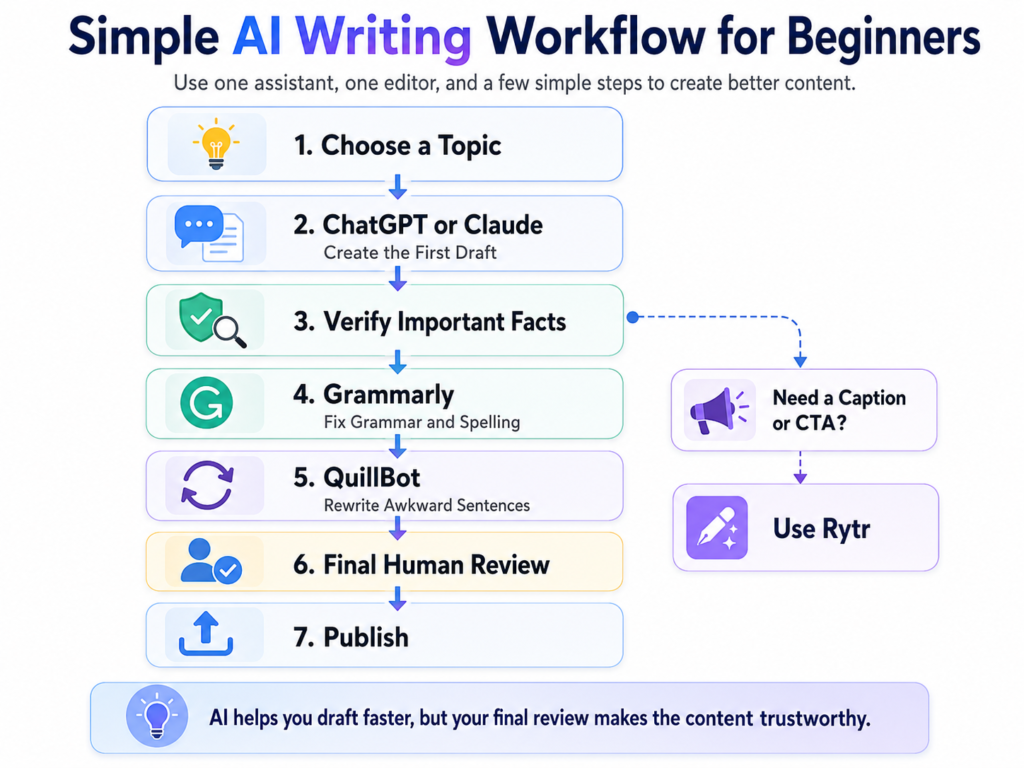
Step 1: Choose one main AI assistant
Start with one of these tools:
- Choose ChatGPT if you want a familiar and versatile general assistant.
- Choose Claude if natural long-form writing is your main priority.
- Choose Gemini if you use Google services and frequently research current information.
- Choose Copilot if you use Microsoft products and the Edge browser.
Use your main assistant to brainstorm, create outlines, and write first drafts.
Example prompt:
Create a beginner-friendly outline for a blog post about growing indoor plants. Include an introduction, five practical tips, common mistakes, and a conclusion.
Step 2: Give the tool clear instructions
AI writing tools produce better results when you provide useful details.
Include information such as:
- The topic
- The target audience
- The required length
- The preferred tone
- The format
- Important points to include
- Facts the tool must not invent
For example:
Write a 700-word beginner guide about organizing digital photos. Use short paragraphs, simple language, and practical examples. Do not invent statistics or personal experience.
Step 3: Review the information yourself
AI assistants can produce incorrect, outdated, or unsupported information.
Before publishing, verify:
- Prices
- Product features
- Dates
- Statistics
- Quotes
- Software limits
- Legal or medical claims
- Company policies
Use official sources whenever possible.
Never publish an AI-generated draft without reviewing it.
Step 4: Edit the draft with Grammarly
After creating the draft, use Grammarly to identify basic grammar, spelling, punctuation, and tone problems.
Do not automatically accept every suggestion. Read the revised sentence and make sure it still expresses your intended meaning.
Step 5: Rewrite awkward sentences with QuillBot
When one paragraph sounds repetitive or unnatural, place a short section into QuillBot.
Compare the available versions and select the one that sounds clearest.
Avoid paraphrasing an entire article simply to make it appear original. The final content should provide genuine value and reflect your own review and editing.
Step 6: Use Rytr for short marketing content
Use Rytr when you need a short piece of content, such as:
- A social media caption
- A call to action
- A short email
- A product description
- An SEO title idea
Its templates can be faster than creating a detailed prompt for every short task.
Can You Trust AI-Generated Writing?
AI writing tools can save time, but they should not replace your judgment.
They may:
- Invent facts
- Misunderstand your instructions
- Use outdated information
- Repeat common or generic advice
- Produce confident but inaccurate statements
- Create text that sounds similar to other AI-generated content
Treat AI as a writing assistant, not as an unquestionable source.
The strongest workflow is:
- Use AI to brainstorm or draft.
- Verify important information.
- Add your own examples and insights.
- Edit for clarity and originality.
- Proofread the final version before publishing.
This process helps you create content that is more useful, accurate, and trustworthy.
My Recommendation
Choosing the right tool depends on what you want to write.
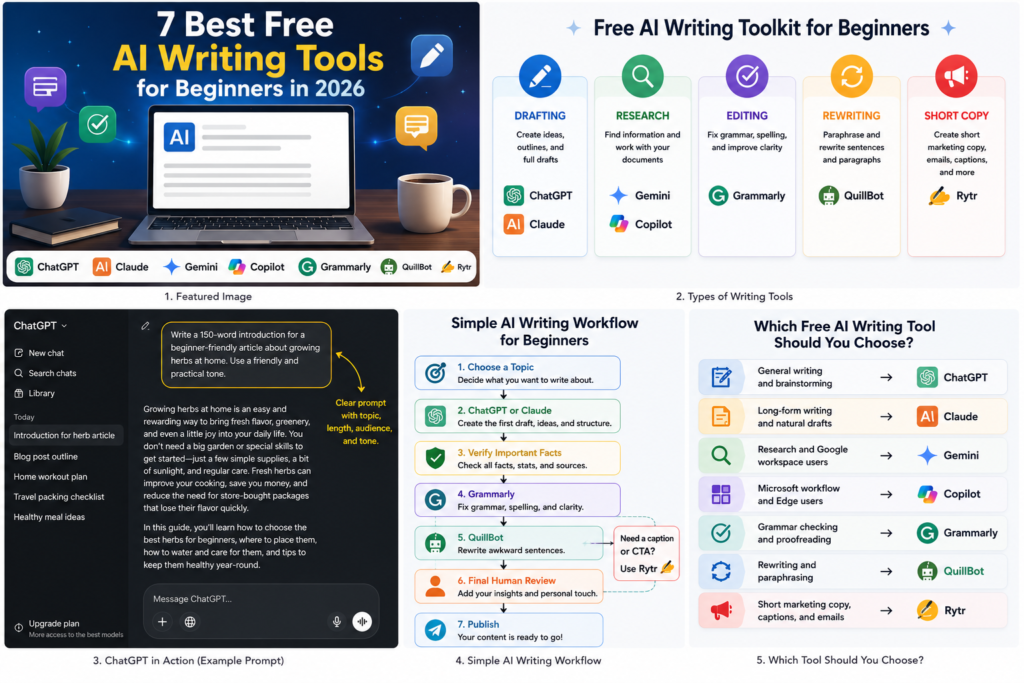
Best overall for complete beginners: ChatGPT Free
ChatGPT is the easiest general starting point for most beginners because it can handle brainstorming, outlining, drafting, rewriting, and general questions in one conversation.
Its free limits can vary, but it remains one of the most flexible options for learning how to work with AI.
Best for natural long-form writing: Claude Free
Claude is a strong option for blog posts, essays, and longer drafts.
Choose it when smooth paragraph flow and natural wording matter more than having the largest collection of extra features.
Best for Google users and research: Gemini Free
Gemini is particularly useful if your writing process involves Google Search, Gmail, Google Drive, or Google Calendar.
Its Connected Apps can make research and document retrieval more convenient, although availability depends on your account and settings.
Best for proofreading: Grammarly Free
Grammarly is the best specialist tool to add after choosing your main AI assistant.
It can catch common grammar and spelling mistakes while you write and help make your final draft look more polished.
Best for rewriting: QuillBot Free
QuillBot is useful when you need to improve a short paragraph or rewrite a sentence that does not sound right.
Its free limits are too restrictive for entire articles, but it works well as an occasional companion tool.
Best for short marketing copy: Rytr Free
Rytr is a practical choice for captions, calls to action, emails, and short promotional content.
Its template-based interface makes it easy for beginners who do not yet feel comfortable writing detailed AI prompts.
Best free beginner writing stack
For most beginners, the best combination is:
- ChatGPT or Claude for ideas, outlines, and first drafts
- Grammarly for grammar and proofreading
- QuillBot for occasional rewriting
You can add Rytr later if you regularly create social captions or short marketing copy.
You do not need to create accounts with every tool on this list. Start with two, learn how they work, and add another only when you have a clear reason to use it.
Conclusion
You do not need an expensive subscription to start writing with AI.
The best free AI writing tools for beginners can help with nearly every stage of the writing process:
- ChatGPT provides a versatile starting point.
- Claude is well suited to natural long-form drafts.
- Gemini is helpful for research and Google-connected workflows.
- Microsoft Copilot supports general writing and web-based tasks.
- Grammarly checks grammar and spelling.
- QuillBot rewrites awkward sentences.
- Rytr creates short marketing content from templates.
Start with one general assistant and one editor. Test them on a small writing project and pay attention to which tool fits your workflow.
Free-plan limits will probably change, but the basic strategy remains the same: use AI to save time, verify important facts, and make the final writing your own.
Frequently Asked Questions
Are these AI writing tools really free?
Yes. Every tool included in the main list currently offers a free way to use at least some of its writing features.
However, the amount of free usage varies. Some tools use monthly limits, while others use flexible limits based on message length, features, demand, or computing resources.
Free plans may also change in the future.
Do I need a credit card to use these tools?
You do not need to purchase a paid subscription to begin using the free versions of these tools.
Signup requirements may vary by service. Some tools may require a free account, while others provide limited access without signing in.
Rytr and Copy.ai specifically state that no credit card is required for their free plans.
Which free AI writing tool is best for beginners?
ChatGPT is the best overall starting point for most beginners because it handles many different writing tasks through a simple conversational interface.
Claude may be a better choice if your main priority is natural long-form writing.
Which tool is best for writing blog posts?
Claude and ChatGPT are both strong options for blog writing.
Claude is useful for smooth long-form drafts, while ChatGPT is especially flexible for brainstorming, outlining, editing, and restructuring content.
Whichever tool you choose, verify all factual information before publishing.
Can I use more than one AI writing tool?
Yes. Different tools can handle different stages of the writing process.
A useful beginner combination is:
- ChatGPT or Claude for the first draft
- Grammarly for proofreading
- QuillBot for rewriting difficult sentences
Using several tools is optional. One assistant and one editor are enough for most beginners.
What is the difference between Grammarly and QuillBot?
Grammarly focuses mainly on correcting and polishing your writing. It helps with grammar, spelling, punctuation, and tone.
QuillBot focuses mainly on rewriting and paraphrasing existing text.
Grammarly is better for proofreading a complete draft, while QuillBot is helpful when a specific sentence or paragraph needs to be reworded.
Can AI writing tools make mistakes?
Yes. AI writing tools can produce incorrect facts, outdated details, invented statistics, and misleading explanations.
Always verify important information using reliable sources, especially when writing about prices, product features, health, finance, law, or current events.
Are AI detectors always accurate?
No. AI detectors can produce false positives and false negatives.
A detector’s result should not be treated as final proof that a person or AI system wrote a piece of content.
Why do free-plan limits keep changing?
AI services require significant computing resources. Companies may adjust their limits based on demand, operating costs, new models, testing, and changes to their paid plans.
Check the official pricing or support page whenever a specific limit is important to your decision.
Should I pay for an AI writing tool?
Start with the free plan first.
Consider upgrading only when the free limits regularly interrupt your work or when a paid feature would clearly save you time.
Testing the free version helps you understand which tool is worth paying for instead of subscribing to several services you may not use.
Enjoyed this guide? Support ByteTony and help us create more simple, beginner-friendly tech guides.
☕ Support ByteTony